


ASIN stands for Amazon Standard Identification Number. It is a unique 10-character code Amazon assigns to every product listing in its marketplace.
Sellers use ASIN numbers to manage listings, track performance, run ads, and optimize rankings in Amazon search results.
Story at a Glance
- An ASIN (Amazon Standard Identification Number) is a unique 10-character code Amazon assigns to every product listing so the marketplace can track catalog data such as rankings, reviews, and inventory.
- Multiple sellers can sell the same product under a single ASIN, which allows reviews, product content, and ranking signals to accumulate on one shared listing page.
- Amazon uses ASIN performance signals such as keyword relevance, conversion rate, and sales velocity to determine how products rank in search results.
- Sellers and brands can analyze competitor listings through reverse ASIN research to uncover high-value keywords and new ranking opportunities.
- Effective ASIN management, including proper variation structure and catalog optimization, can significantly improve visibility and sales for Amazon brands.
Where Can You Find an Amazon ASIN?

Method 1: Product URL
The ASIN usually appears in the product URL.
Example:
The code following /dp/ represents the ASIN.
Method 2: Product Details Section

Scroll to the Product Information section on a listing page. The ASIN is typically listed alongside product specifications.
Method 3: Seller Central
In Seller Central, ASINs appear in the Manage Inventory dashboard, listing reports, and advertising campaigns.
What Is the Difference Between Parent and Child ASIN?

Amazon organizes product variations using a parent-child ASIN structure.
Understanding this structure is critical for brands selling products with multiple options such as size, color, or style.
What is a Parent ASIN?
A parent ASIN groups related product variations together. The parent listing acts as the main product page but typically cannot be purchased directly.
What is a Child ASIN?
Each variation receives its own child ASIN.
Examples include different sizes, colors, or product styles.
|
Product |
ASIN Type |
|
Running Shoes |
Parent ASIN |
|
Running Shoes – Black – Size 9 |
Child ASIN |
|
Running Shoes – Black – Size 10 |
Child ASIN |
For brands managing multiple complementary products, grouping related items strategically can also improve cross-selling opportunities and merchandising strategies such as virtual bundles.

ASIN vs SKU vs UPC vs FNSKU (Full Comparison)
Sellers often confuse ASIN numbers with other product identifiers.
|
Identifier |
Used By |
Purpose |
|
ASIN |
Amazon |
Identifies product listings |
|
SKU |
Seller |
Internal inventory tracking |
|
UPC / GTIN |
Manufacturer |
Universal retail barcode |
|
FNSKU |
Amazon FBA |
Tracks units in fulfillment centers |
What Is an SKU?
A SKU (Stock Keeping Unit) is an internal identifier created by the seller. Unlike ASINs, SKUs are not visible to customers and can be customized by each brand or retailer. Sellers use SKUs to track inventory, manage product variations, and monitor sales performance across sales channels.
What Is a UPC or GTIN?
A UPC (Universal Product Code) or GTIN (Global Trade Item Number) is a barcode identifier assigned by manufacturers and recognized globally in retail systems. Amazon often requires a GTIN when creating a new listing because it helps verify product authenticity and prevent duplicate catalog entries.
What Is an FNSKU?
The FNSKU (Fulfillment Network Stock Keeping Unit) is used specifically for products stored in Amazon fulfillment centers through Fulfillment by Amazon (FBA).
Unlike the standard SKU, the FNSKU identifies the seller’s specific inventory units within Amazon’s warehouses. This is important because multiple sellers may offer the same ASIN. The FNSKU ensures that Amazon attributes the correct inventory units to the correct seller when fulfilling orders.
How to Create a New ASIN on Amazon?
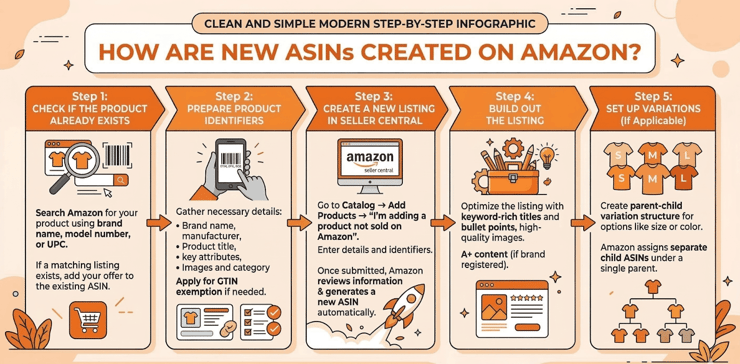
Sellers do not manually generate ASIN codes. Instead, Amazon creates an ASIN automatically when you submit a new product to the catalog. The key is providing the correct product data so Amazon can validate and publish the listing.
Step 1: Check if the Product Already Exists
Search Amazon for your product using brand name, model number, or UPC. If a matching listing exists, you should add your offer to the existing ASIN instead of creating a new one.
Step 2: Prepare Product Identifiers
For a new product, you typically need a GTIN (UPC, EAN, or ISBN) along with:
- Brand name and manufacturer
- Product title and key attributes
- Images and category details
If you do not have a GTIN, you can apply for a GTIN exemption in Seller Central for eligible categories.
Step 3: Create a New Listing in Seller Central
Go to Catalog → Add Products → I’m adding a product not sold on Amazon. Enter your product details and identifiers. Once submitted, Amazon reviews the information and generates a new ASIN automatically.
Step 4: Build Out the Listing
After the ASIN is created, optimize the listing with:
- Keyword-rich title and bullet points
- High-quality images
- A+ content (if brand registered)
From an operational standpoint, the quality of the data you submit during ASIN creation directly impacts how the product performs in search and conversion.
Step 5: Set Up Variations (If Applicable)
If your product has multiple options, such as size or color, create a parent-child variation structure. Amazon will assign separate child ASINs for each variation under a single parent listing.
Creating ASINs correctly from the start helps prevent duplicate listings, improves catalog accuracy, and sets a strong foundation for Amazon SEO and advertising performance.
How Do Sellers Use ASINs for Amazon SEO?
Beyond catalog organization, ASINs play a major role in Amazon search optimization and competitor research.
Reverse ASIN Keyword Research

Many Amazon analytics tools allow sellers to analyze competitor ASINs. This process, often called Reverse ASIN Lookup, reveals ranking keywords, search positions, and traffic opportunities. Sellers often use marketplace analytics tools and retail data insights to identify ranking patterns and uncover new growth opportunities, including Reverse ASIN Lookup.
beBOLD Digital Expert Tip
Focus on optimizing high-intent keywords in titles and bullet points first. Listings that align closely with customer search terms tend to improve both rankings and conversion rates.
Product Page Optimization
Improving ASIN performance typically involves optimizing product titles, bullet points, images, A+ content, and reviews.
Competitor Analysis
ASIN data allows brands to benchmark competitors, analyze pricing strategies, evaluate listing quality, and identify keyword gaps.
ASIN Targeting in Amazon Advertising

ASIN targeting is a powerful feature within Amazon Sponsored Products campaigns. It allows brands to capture high-intent shoppers already browsing similar products.
Instead of targeting keywords, advertisers can target specific product listings. When implemented strategically, this type of targeting becomes a key component of broader sponsored advertising frameworks designed to capture high-intent traffic.
beBOLD Digital Expert Tip
Start by targeting competitor ASINs with lower review counts or weaker product content. These listings often convert more easily when your product offers stronger value or differentiation.
How beBOLD Digital Helps Optimize Amazon Listings
Managing ASINs effectively requires a strong understanding of Amazon’s catalog structure, search algorithm, and advertising ecosystem.
If you’re a brand wanting help navigating the Amazon seller ecosystem, you’re in luck. beBOLD Digital helps brands improve their Amazon performance through listing optimization, reverse ASIN competitor analysis, catalog structure optimization, PPC management, and ongoing listing performance monitoring. Contact beBOLD Digital today to optimize your Amazon listings and unlock the full potential of your ASINs.
Frequently Asked Questions About Amazon ASINs
What does ASIN stand for on Amazon?
ASIN stands for Amazon Standard Identification Number, a 10-character code used to identify product listings within Amazon’s catalog.
What is an ASIN number used for?
An ASIN number connects product data such as listings, reviews, search rankings, and seller offers.
Can multiple sellers use the same ASIN?
Yes. If multiple sellers offer the exact same product, they can list under the same ASIN.
Is an ASIN the same as a SKU?
No. An ASIN identifies the product listing, while a SKU is an internal inventory tracking code created by the seller.
Do product variations have different ASINs?
Yes. Each variation such as size or color receives its own child ASIN, while the group of variations is organized under a parent ASIN.









Comments