



A multi-channel listing audit compares product information, pricing, and sellable availability across sales channels against approved records and channel-specific rules. It identifies incorrect or outdated details, distinguishes intentional differences from errors, and assigns fixes that are verified after publication.
For an established brand, the challenge is keeping every channel aligned as products change. A corrected size may reach Amazon while Walmart retains an old image and TikTok Shop uses an earlier description.
At beBOLD Digital, listing management is part of our Amazon account management work. Our recommendation is to treat cross-channel accuracy as an ongoing responsibility, with named owners and evidence of completed corrections.
What Does Product Listing Drift Mean?
Product listing drift is the unintended divergence over time between approved product information and what a sales channel displays.
Drift can start when a packaging update reaches only one marketplace, a manual edit overrides a feed, or an integration maps the wrong field. Unclear ownership allows those differences to persist.
A cross marketplace listing audit investigates these disagreements across equivalent products. It adds a consistency check to your broader marketplace review.
If accurate, aligned listings still underperform, use beBOLD’s Amazon listing audit guide to investigate visibility, click-through rate, conversion, and offer strength. Here, the priority is establishing which information is correct and whether each channel reflects it.
Important Considerations for Cross-Channel Differences
beBOLD recommends classifying a difference before assigning a fix. Consistency means preserving accurate product facts while allowing approved adaptations.
|
Area |
What should remain aligned |
What may legitimately differ |
|
Product identity |
Formula, size, pack count, variant, and included items for the same product version |
A separately identified bundle or exclusive size |
|
Content and imagery |
Accurate claims, instructions, and product representation |
Title wording, image order, and presentation |
|
Commercial settings |
Approved rules for the relevant offer |
Prices, promotions, shipping terms, and stock allocations |
Record the reason, approver, and review or expiration date for each exception. An unexplained difference needs investigation; it is not automatically an error.
Before reconciling a size or pack-count mismatch, confirm that both listings represent the same product version. Otherwise, a well-intended correction could overwrite accurate information for a different item.
How to Run a Multi-Channel Listing Audit in Six Steps
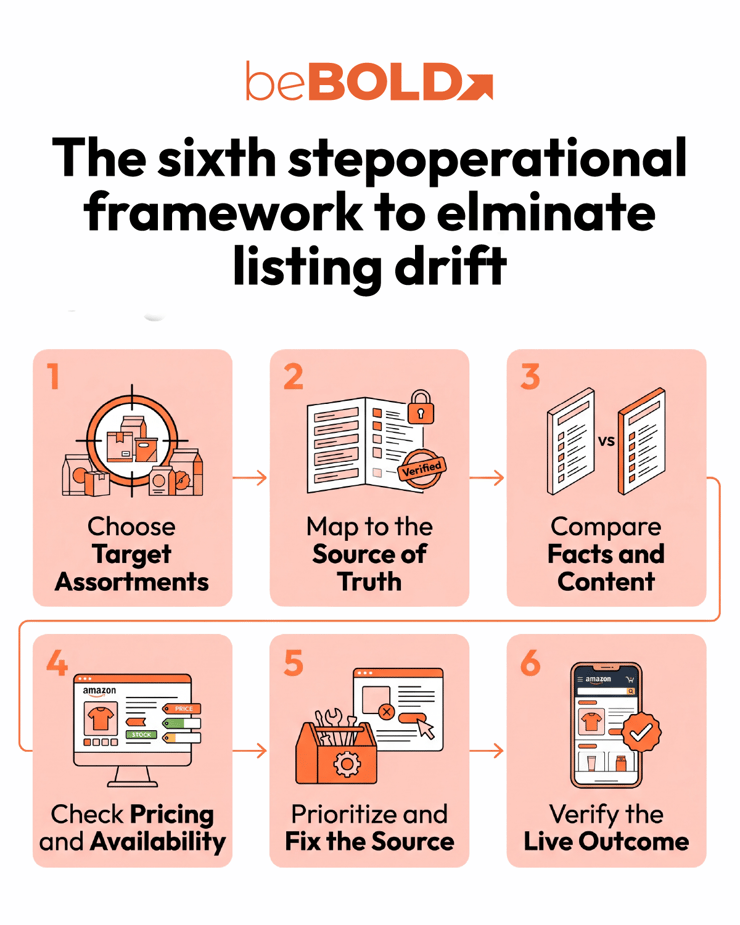
1. Choose the Products and Channels to Review
Start with products where inaccurate information could create the greatest customer or commercial impact:
-
Recently changed formulas, packaging, sizes, or bundles.
-
Listings with repeated customer complaints or unresolved catalog issues.
-
Bestsellers and products receiving substantial advertising traffic.
-
Newly launched channels or recently changed integrations.
Define the intended assortment for each channel. A missing variant is a finding only if that variant should be offered there.
Create a scope sheet with the internal product ID, channel listing URL, variant, seller offer, fulfillment method, and capture time. Record a consistent delivery location when reviewing availability or shipping promises.
2. Map Each Listing to Approved Product Information
Connect each internal stock keeping unit (SKU) to its channel SKU, marketplace listing ID, and Global Trade Item Number (GTIN), where applicable. On Amazon, also record the Amazon Standard Identification Number (ASIN).
Check size, formula, pack configuration, and product version before treating records as equivalent. Matching titles or similar SKU names are insufficient.
Next, identify the authoritative source and owner for each field:
-
Product facts: approved specifications, packaging, or product information management (PIM) records.
-
Prices and promotions: approved commercial plans.
-
Availability: the relevant inventory system and allocation rules.
-
Creative assets: the approved asset library and version.
Use the Amazon Category Listing Report as one input alongside exports from other channels. Preserve dated originals.
For each field, distinguish the approved value, submitted value, and live value. This comparison helps locate whether an error began in the source record, the submission, or publication.
3. Compare Product Facts Content Images and Variations

Review the customer-facing page alongside the corresponding records. Check meaning as well as exact text.
For a beauty product, inspect:
-
Size, shade, scent, formula version, and pack count.
-
Ingredients, usage instructions, warnings, and approved claims.
-
Titles, descriptions, bullets, attributes, and text embedded in images.
-
Selected variants and the products their images represent.
-
Category placement and required fields for the relevant marketplace.
Normalize units before flagging a mismatch. Equivalent metric and US measurements can look different; compare them against the approved label and its rounding.
For channel-specific improvements after reconciliation, use beBOLD’s Walmart beauty listing quality guide to review category, imagery, and variant presentation.
The TikTok Shop vs. Amazon comparison provides context for adapting presentation to each platform. Keep the product facts intact throughout those adaptations.
Record keyword opportunities separately for an Amazon SEO audit. This keeps factual corrections visible instead of burying them in a general copywriting task.
4. Check Pricing Promotions and Sellable Availability
Compare the same product, pack size, seller offer, currency, and review time. Check the base price, active discount, coupon conditions, shipping charge, and promotion end date.
Ask whether each difference matches the approved plan. Review channel fees and fulfillment costs before recommending a price change; an identical selling price can produce different margins.
For inventory, compare the appropriate stock pool and allocation. Shopify distinguishes on-hand inventory from available, committed, unavailable, and incoming quantities. Available inventory excludes units already committed or held as unavailable. Shopify’s inventory-state definitions explain these distinctions.
Check:
-
Which warehouse or fulfillment pool supplies each offer.
-
Whether reservations and safety stock are reflected correctly.
-
When the last update was sent and accepted.
-
Whether recent legitimate orders produced the expected stock changes.
Investigate stale updates and overselling exposure. Identical displayed quantities across channels do not establish that the underlying inventory process is correct.
5. Prioritize Findings and Fix the Responsible Source
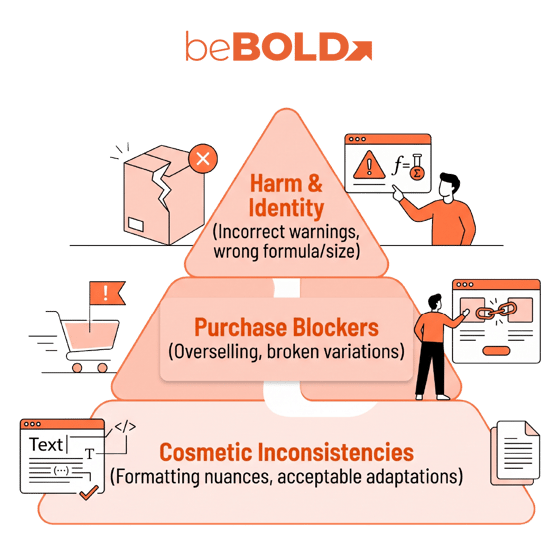
beBOLD recommends prioritizing potential harm and product identity first, then purchase blockers, customer confusion, and commercial exposure. Cosmetic inconsistencies usually follow.
Severity depends on context. Incorrect usage instructions may require immediate escalation; a harmless formatting difference may need no correction.
Use one audit-log row per product, channel, and affected field. Include:
-
Approved, submitted, and observed values.
-
Evidence link and capture date.
-
Severity and approved-exception status.
-
Suspected cause, accountable owner, correction, and due date.
-
Verification requirement and current status.
Trace repeat errors to their controlling source. If a scheduled feed restores an outdated description, correcting only the marketplace page leaves the cause unresolved.
When a shared mapping or source record is responsible, check other products using it. Preserve the original export and validate a small set before applying a broad correction.
6. Verify the Live Correction Before Closing the Finding
Use separate statuses for submitted, processed, and live verified.
Amazon’s Listings Items API documentation explains that accepting a submission for processing does not report every issue that may arise later. It also distinguishes submitted attributes from live listing data such as fulfillment availability. See Amazon’s listing-update considerations.
Our recommendation is to verify the affected result directly:
-
Review processing errors or warnings.
-
Reopen the correct live product and variant.
-
Check every affected placement, including images and attributes.
-
Confirm offer availability through the appropriate records.
-
Save dated evidence and the verifier’s name.
Keep unresolved findings open if the submission is correct but the live value remains wrong. Where scheduled automation could overwrite the change, recheck after its next run before treating the underlying issue as resolved.
A Beauty Product Audit in Practice
Consider a hypothetical moisturizer sold across Amazon, Walmart, TikTok Shop, and a Shopify store. The approved product record and physical label specify 50 mL, approximately 1.7 US fl oz. Every listing maps to the same single-unit product.
|
Finding |
Decision |
Action |
|
Walmart’s description says 60 mL |
Factual discrepancy |
Trace the source, correct it, and verify the live description |
|
TikTok Shop has an approved temporary discount |
Intentional difference |
Record authorization and check the end date |
|
Shopify uses a shorter title with accurate facts |
Acceptable adaptation |
Retain the title |
|
Amazon’s copy says 50 mL, but an image says 60 mL |
Contradictory product information |
Replace the affected asset and verify publication |
Suppose the investigation finds that Walmart’s feed draws from an outdated description field, while Amazon uses an old image file.
The Walmart owner corrects the source and republishes. The creative owner supplies the approved image to the Amazon channel manager. Each finding remains open until the affected live placement is checked.
The audit also records the shared preventive task: retire the outdated field and asset from future publishing workflows.
This example shows why an audit needs evidence and ownership. The promotion and shorter title can stay; the incorrect volume claims need correction.
How to Keep Product Listing Drift From Returning
Build verification into your change process. Whenever a formula, label, asset, bundle, or commercial rule changes, record the affected channels and assign a confirmation owner.
Maintain a change log that includes the effective date, approved values, affected product versions, and supporting assets. Keep exceptions visible so future reviewers understand intentional differences.
beBOLD recommends choosing audit frequency based on risk. A monthly review of priority products may be a useful starting point, supported by checks after material changes and more frequent monitoring of stock or price exceptions. Adjust that cadence to catalog complexity and change volume.
Track material discrepancies, time to verified correction, and recurrence. Repeated errors in one field are a reason to review its ownership or mapping.
Coordinate content maintenance with your Amazon listing refresh strategy. Before increasing paid traffic, pair the accuracy review with an Amazon beauty retail-readiness check to evaluate the broader purchase experience.
Give Every Listing Correction an Owner and a Verified Outcome
A useful audit leaves your team with clear decisions: which differences need correction, who controls the affected fields, and what evidence will close each finding.
beBOLD Digital can help you investigate Amazon catalog issues within a broader marketplace strategy. If recurring discrepancies are consuming your team’s time, talk with beBOLD about Amazon account management and how to coordinate listing maintenance with your brand’s product and operations teams. Schedule a call with us today.
 Frequently Asked Questions
Does a PIM or Feed Tool Eliminate the Need for an Audit
No. These tools can distribute and transform product information, but their usefulness depends on approved inputs, correct mappings, and supported destination fields. An audit checks the resulting listings and identifies exceptions that still need investigation.
Do Higher Returns on One Channel Prove Product Listing Drift
No. Different return rates can reflect fulfillment problems, customer mix, promotions, product batches, or return policies. Review return reasons alongside verified discrepancies before attributing the difference to listing content.
What Should a Professional Multi-Channel Audit Deliver
It should provide a product mapping, dated evidence, approved exceptions, prioritized findings, accountable owners, correction steps, and verification criteria. It should also identify recurring causes and recommend changes that help prevent the same errors from returning.








Comments