



Amazon listing keywords are the search terms shoppers use to find products on Amazon, and they help Amazon understand what your product is, who it is for, and when it should appear in search results. For sellers in competitive categories like beauty, wellness, baby, pet, household, and Amazon KDP, strong keyword targeting means placing the right terms in the right fields so your listing can rank, attract qualified shoppers, and convert.
What Are Amazon Listing Keywords?
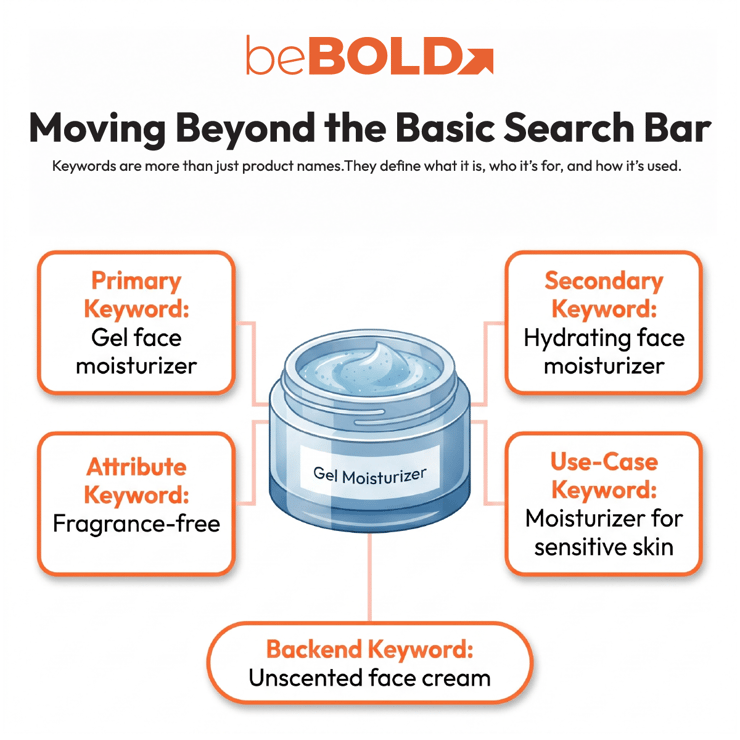
Amazon listing keywords are words or phrases that describe your product, its features, benefits, how it’s used, and what shoppers are looking for.
For example, a skincare brand selling a fragrance-free gel moisturizer may use:
|
Primary keyword |
gel face moisturizer |
|
Secondary keyword |
hydrating face moisturizer |
|
Attribute keyword |
fragrance-free moisturizer |
|
Use-case keyword |
moisturizer for sensitive skin |
|
Backend keyword |
unscented face cream |
You can use these keywords in your product title, bullet points, description, A+ Content, backend search terms, and product attributes.
beBOLD Digital Expert Tip: Only put the most important keywords in your title. Use bullet points for benefits and use cases, and save relevant synonyms for backend search terms if they don’t fit naturally in your main copy.
Why Amazon Listing Keywords Matter

Amazon listing keywords help your product show up in the right shopper searches. But your ranking depends on more than just keywords.
Amazon also looks at how shoppers interact with your listing, such as:
- Click-through rate
- Conversion rate
- Sales performance
- Pricing competitiveness
- Reviews and ratings
- Listing completeness
- Product relevance
This means your keywords should attract the right shoppers, not just more visitors. If your listing ranks for the wrong keywords, you might get views but not sales.
For a deeper keyword workflow, see beBOLD Digital’s guide to Amazon keyword research tips.
How to Find Keywords for an Amazon Listing
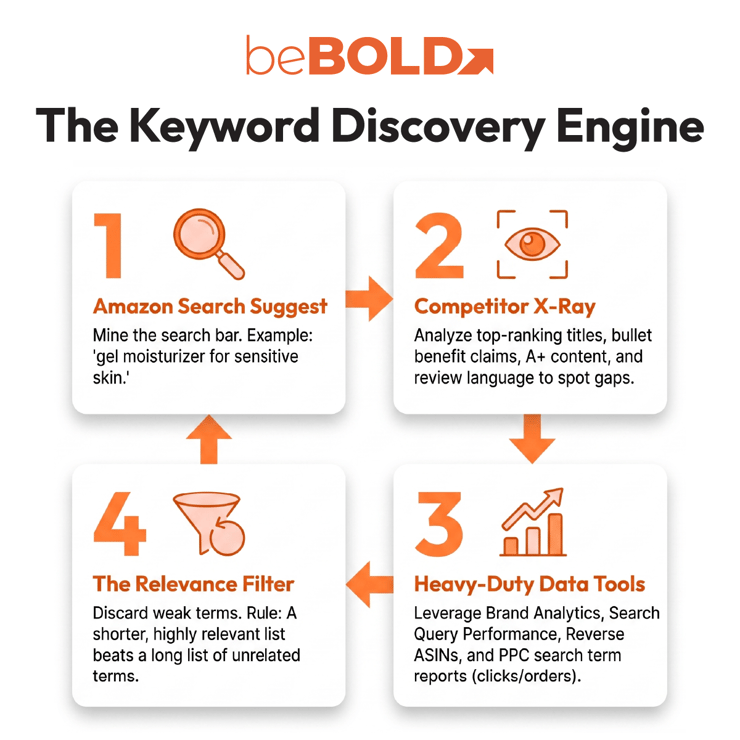
To find keywords for an Amazon listing, start with shopper language, then validate your list with Amazon data, competitor research, and keyword finder tools.
1. Start With Amazon Search Suggestions
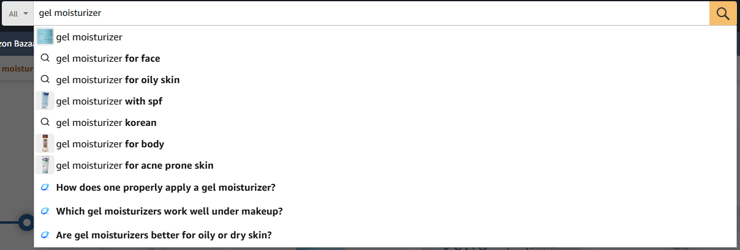
Type a seed keyword into Amazon’s search bar to find common shopper searches, such as “gel moisturizer for face,” “gel moisturizer for sensitive skin,” or “oil-free moisturizer.”
2. Review Competitor Listings
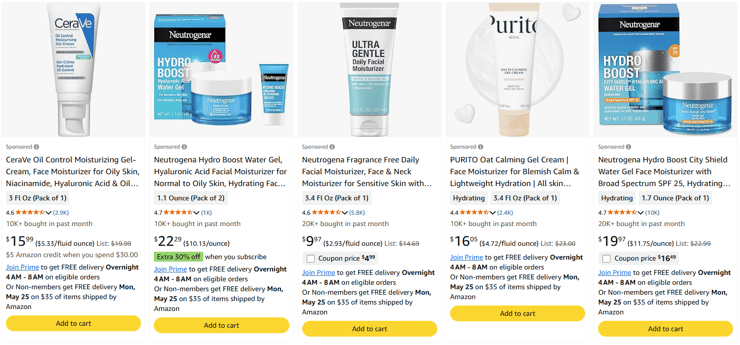
Check top-ranking product titles, bullet points, A+ Content, image text, reviews, and repeated benefit claims to find keyword patterns and shopper priorities.
3. Use Keyword Finder and Research Tools
Use Amazon autocomplete, Brand Analytics, Search Query Performance, Product Opportunity Explorer, PPC search term reports, Helium 10, Jungle Scout, reverse ASIN tools, and Google keyword data to expand and validate your list.
4. Filter Keywords by Relevance
Prioritize keywords that accurately match the product, formula, use case, and buyer intent. A fragrance-free gel moisturizer, for example, should not target “anti-aging cream” unless the product genuinely supports that claim.
beBOLD Digital Expert Tip: A shorter, more relevant keyword list often works better than a long list with weak or unrelated terms.
Want to build a stronger Amazon keyword strategy? Start with beBOLD Digital’s guide to Amazon keyword research tips to learn how to find better search terms, then review our guide to Amazon backend keywords to place hidden keywords more strategically without cluttering your listing.
How to Add Keywords to an Amazon Listing
Adding keywords to your Amazon listing means putting each keyword where it helps both search visibility and makes things clear for shoppers.
Product Title
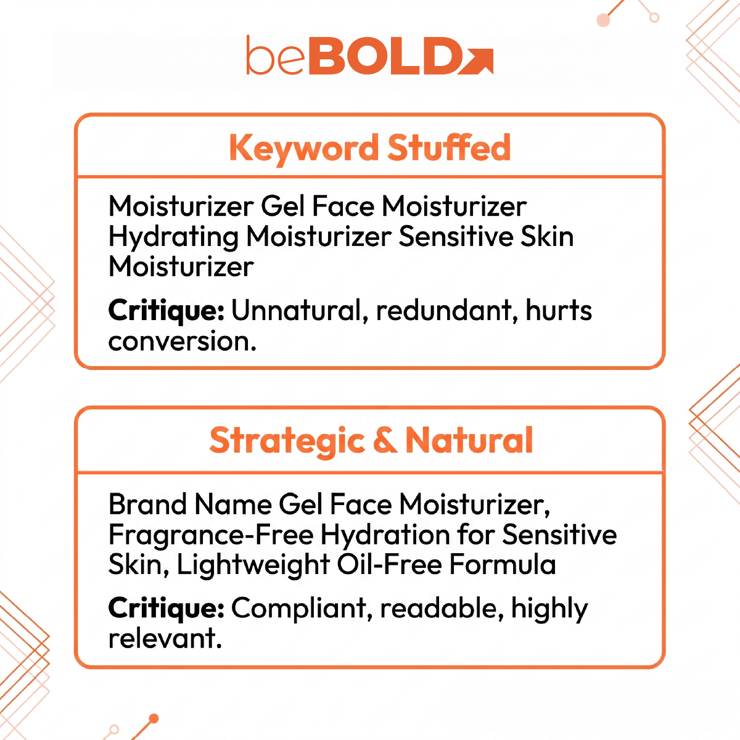
Your product title should have the main keyword near the beginning, but it should still sound natural.
Weak title:
“Moisturizer Gel Face Moisturizer Hydrating Moisturizer Sensitive Skin Moisturizer”
Better title:
“Brand Name Gel Face Moisturizer, Fragrance-Free Hydration for Sensitive Skin, Lightweight Oil-Free Formula”
Amazon’s January 21, 2025 title rule update made it even more important to have clear, compliant titles. Most titles can’t be longer than 200 characters, some special characters aren’t allowed, and you shouldn’t repeat the same word more than twice unless it’s a common word.
For more title guidance, review beBOLD Digital’s guide to Amazon product title optimization.
Bullet Points
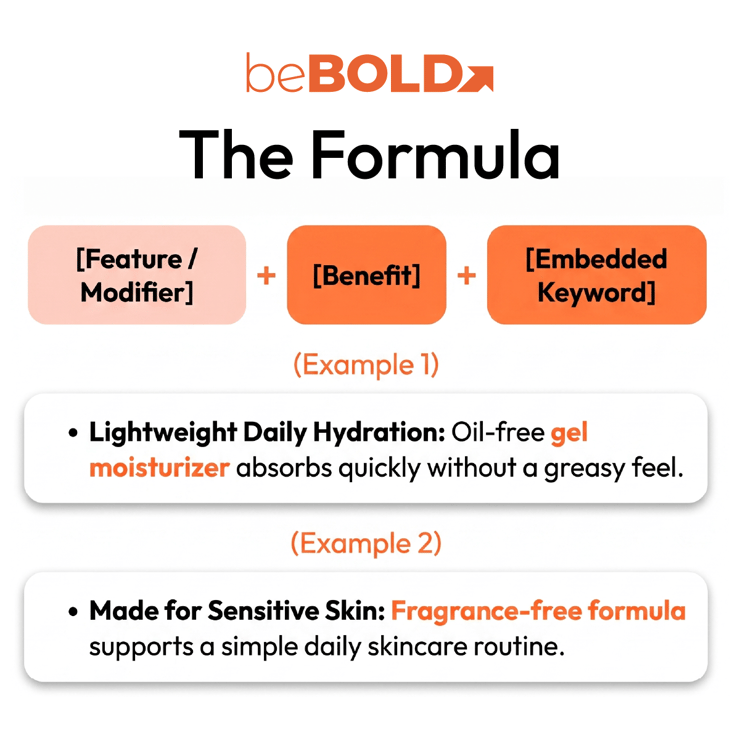
Use bullet points to highlight secondary keywords, features, benefits, and how the product can be used.
Example:
- Lightweight Daily Hydration: Oil-free gel moisturizer absorbs quickly without a greasy feel.
- Made for Sensitive Skin: Fragrance-free formula supports a simple daily skincare routine.
- Smooth, Non-Greasy Finish: Hydrating face moisturizer works under sunscreen or makeup.
- Easy Morning or Night Use: Designed for everyday hydration without heavy residue.
This format helps Amazon understand your listing and gives shoppers clear reasons to buy.
Product Description and A+ Content

Use your product description and A+ Content to educate shoppers, show what makes your brand different, and help boost sales.
Good places to include secondary keywords:
- Product story
- Ingredient or material explanations
- Usage instructions
- Comparison charts
- Benefit-focused modules
- FAQ-style content
A+ Content might not impact keywords as much as titles or bullets, but it can help shoppers understand your product and increase sales, which improves your overall listing.

Backend Search Terms
Backend search terms are hidden keywords you add in Seller Central. Shoppers can’t see them, but Amazon uses them to understand different ways people might search for your product.
Use backend terms for:
- Synonyms
- Alternate spellings
- Abbreviations
- Related search phrases
- Keywords that do not fit naturally in visible copy
Avoid:
- Repeating visible keywords
- Competitor brand names
- Irrelevant terms
- Unsupported claims
- Keyword stuffing
For a deeper explanation, see beBOLD Digital’s Amazon backend keywords guide.
Amazon Listing Keyword Placement Map: Where to Place Keywords Best

Amazon keywords work best when each listing field has a clear role. Instead of repeating the same phrase across the entire listing, sellers should map keywords based on importance, readability, and shopper intent.
|
Listing Field |
Best Keyword Use |
How to Use It Strategically |
|
Title |
Primary keyword and strongest modifiers |
Use the title for the most important phrase that describes the product, along with major modifiers like size, flavor, scent, material, quantity, or target use. The title should help shoppers understand the product quickly without keyword stuffing. |
|
Bullets |
Secondary keywords, benefits, and use cases |
Use bullet points to expand on the product’s main benefits while naturally adding secondary keywords. This is where sellers can include terms related to shopper pain points, product features, usage occasions, and differentiators. |
|
Description |
Product details, shopper education, and supporting terms |
Use the description to explain the product more fully, especially details that need more context. This section can support long-tail keywords, product instructions, ingredient notes, compatibility information, or care details. |
|
A+ Content |
Brand story, FAQs, comparison points, and conversion support |
Use A+ Content to strengthen shopper confidence through visuals, comparison charts, FAQs, and brand positioning. While A+ Content is often more conversion-focused than direct keyword-focused, it can still reinforce important product themes and answer common buyer questions. |
|
Backend Search Terms |
Synonyms, variants, and overflow keywords |
Use backend search terms for relevant keywords that do not fit naturally in visible copy. These may include synonyms, alternate spellings, abbreviations, Spanish-English variations if relevant, or secondary phrases that support indexing without cluttering the listing. |
|
Attributes |
Size, color, material, ingredient, compatibility, and category details |
Use product attributes to give Amazon structured information about the item. Accurate attributes help with filtering, category relevance, and shopper discovery, especially for products where size, ingredient, scent, skin type, age range, or compatibility affects purchase decisions. |
For broader listing improvements, review beBOLD Digital’s Amazon listing optimization guide and Amazon SEO checklist.
beBOLD Client Scenario: Fixing Keyword Gaps in a Beauty Listing
A beauty brand may come to beBOLD Digital with strong ad spend but weak organic ranking. The product gets traffic, but its title is too broad, the bullets repeat the same phrase, and backend search terms are filled with low-value keywords.
beBOLD Digital would first audit the listing, competitor keywords, PPC search term data, and Search Query Performance insights. From there, the team would rebuild the keyword map so each field has a clear purpose.
The title would target the main keyword. Bullets would cover benefits, skin type, use case, and formula modifiers. Backend search terms would hold relevant synonyms. A+ Content would support shopper confidence and conversion.
The result is a cleaner, more strategic listing built for both Amazon SEO and shopper decision-making.
Common Amazon Listing Keyword Mistakes
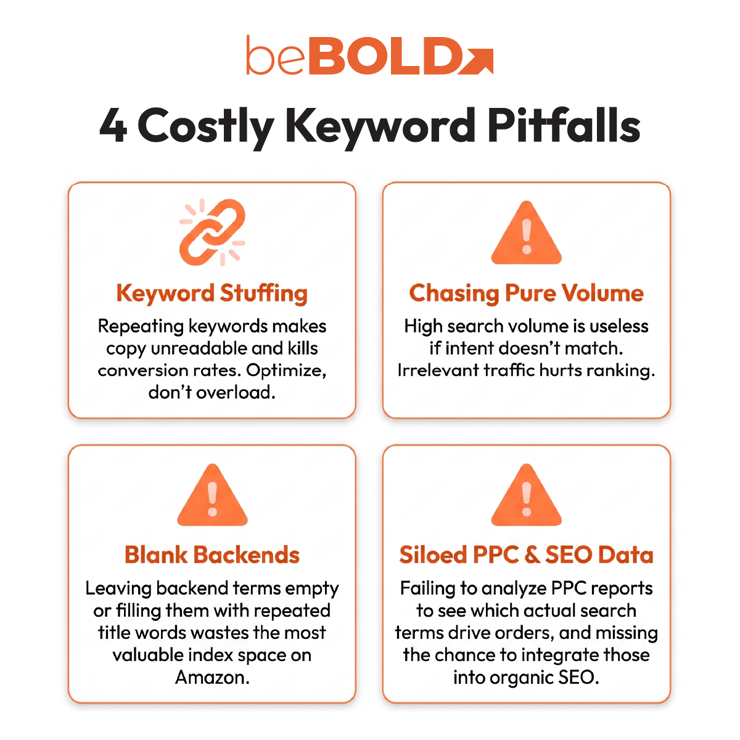
Because keyword placements are highly dependent on sellers, it’s almost impossible to get it right the first time. The good thing is that mistakes are very easy to correct when it comes to listing keywords. Here are some mistakes you should keep in mind:
- Keyword Stuffing
Repeating the same keyword too many times makes a listing harder to read and may reduce conversion. Amazon listings should be optimized, not overloaded.
- Targeting Irrelevant High-Volume Keywords
A keyword with high search volume is not useful if the product does not match the shopper’s intent. Relevance matters more than volume alone.
- Ignoring Backend Keywords
Backend search terms are useful for keywords that don’t fit naturally in your main copy. Don’t leave them blank or fill them with repeated keywords, as that wastes valuable space.
- Separating PPC and SEO Data
Amazon PPC data shows which keyword search terms actually lead to sales. Use these insights to improve your listing.
Need Help Choosing the Right Amazon Listing Keywords?
Amazon listing keywords are most effective when you place them thoughtfully throughout your listing, not just anywhere. A good keyword strategy can boost your relevance, visibility, click quality, and chances of making a sale.
beBOLD Digital helps Amazon sellers find the right keywords, improve titles, make better use of backend search terms, strengthen listing copy, and connect SEO with PPC data. If your listings get traffic but not enough sales or ranking, a keyword audit can reveal what’s missing. Schedule a call with us today and we’ll help you figure out what’s missing!
Frequently Asked Questions
Forgetting Product Attributes
Details like size, color, material, scent, ingredients, and compatibility also help Amazon understand and sort your product.AQs About Amazon Listing Keywords
What are keywords for Amazon listing optimization?
Keywords for Amazon listing optimization are search terms added to your title, bullets, description, backend terms, and attributes to help Amazon match your product with relevant shopper searches.
How do I find keywords for an Amazon listing?
You can find keywords for an Amazon listing using Amazon autocomplete, competitor research, reverse ASIN tools, Brand Analytics, Search Query Performance, keyword finder tools, PPC reports, and customer review language.
How do I add keywords to an Amazon listing?
Add keywords naturally to your product title, bullet points, description, A+ Content, backend search terms, and product attributes. Place your main keyword in the title, use secondary keywords in the bullets, and keep synonyms for the backend terms.
Should I use the same keywords in the title and backend search terms?
Usually, you shouldn’t repeat keywords in both the title and backend search terms. Use backend search terms for relevant keywords that aren’t already in your main listing.
Do Amazon KDP keywords work the same way?
Amazon KDP keywords also help Amazon understand and sort your book, but the strategy for books is different from physical products. KDP sellers should focus on what readers want, the book’s genre, topic, and how easy it is to find in book categories.









Comments