



An Amazon account-level reserve is money that Amazon temporarily holds back from your available balance. This is done to cover things like refunds, chargebacks, A-to-z Guarantee claims, account reviews, or tax requirements. The money is not lost, but you cannot access it until the issue is resolved.
What Is an Amazon Account-Level Reserve?

An Amazon account-level reserve is money that Amazon temporarily holds back from your available balance. This helps make sure there are enough funds to cover any possible liabilities.
Common Reasons for Reserve Holds
-
Open A-to-z Guarantee claims
-
Customer chargebacks
-
Refund and return exposure
-
Seller performance concerns
-
Unexpected spikes in sales or account activity
-
New account or identity verification reviews
-
Applicable tax withholding requirements
Amazon reviews reserves for each account separately, so the reason, amount, and release timeline can be different for every seller. Check the Payments section in Seller Central to see your reserve amount and the reason for the hold.
Note: A reserve is not an Amazon fee or permanent deduction. However, the amount will remain excluded from your available balance until the related claim, chargeback, or review is fully resolved.
Seller Example: When an Account-Level Reserve May Appear
Let’s say a seller experiences a sudden increase in sales during a promotion, followed by several refunds, an open A-to-Z Guarantee claim, and a customer chargeback. Amazon may temporarily place part of the seller’s balance in Account-Level Reserve while these issues are reviewed and potential customer reimbursements are covered.
The seller may still have a healthy account overall, but the reserved amount will remain unavailable for disbursement until the related claims, chargebacks, or account review are resolved. In this situation, the seller should check Statement View, Account Health, open claims, and recent transactions to identify what is contributing to the hold.
Account-Level Reserve vs. Deferred Transactions
Both account-level reserves and deferred transactions affect your payments, but they are not the same thing.
|
Status / Term |
Definition |
Primary Cause |
Release Timeline |
|
Account-Level Reserve |
Funds held to cover account liabilities or performance risks. |
Claims, chargebacks, reviews, tax withholding. |
Variable; tied to issue resolution. |
|
Deferred Transactions |
Order-level proceeds waiting for standard delivery-based hold periods. |
Amazon's Delivery Date + 7 (DD+7) policy. |
Typically ~7 days post-delivery. |
|
Available Balance |
Liquid funds currently eligible for disbursement to your bank. |
Completed holds and cleared order transactions. |
Standard payout schedule. |
|
Reserved Inventory |
FBA units temporarily unavailable for sale or fulfillment. |
Processing, FC transshipment, customer allocation. |
Automatic upon processing. |
With Amazon’s DD+7 payment policy, order proceeds are usually held for seven days after delivery. These holds typically show up as Deferred transactions, not as account-level reserves.
This difference is important. A deferred transaction usually has a set payment date, but an account-level reserve often means you need to fix an issue before you can access the funds.

Why Is My Amazon Account-Level Reserve So High?

A high reserve does not always mean your account is suspended or that each reserved dollar is tied to a single transaction. Several different obligations can add up to the total.
Open A-to-z Guarantee Claims
Amazon may hold the amount related to an active claim until it is resolved. Check your open claims and send in any requested documents as soon as possible.
Sellers can review how the Amazon A-to-z Guarantee works, including how claims may affect account performance and seller funds.
Chargebacks
If a buyer disputes a transaction with their card issuer, Amazon can hold the funds for that order while the chargeback is being reviewed.
Relevant documentation may include:
-
Valid tracking information
-
Delivery confirmation
-
Order records
-
Product information
-
Buyer communication
-
Refund or replacement records
Want to learn how beBOLD Digital helped a brand reduce their rate of Amazon chargebacks? Head over to our Amazon Chargeback Recovery case study!
Refund and Return Exposure
Recent refunds and unresolved returns can affect how much money you can withdraw. Check your Amazon returns and RMA process to make sure return requests, approvals, refunds, and inventory updates are handled properly.
Not every return will create an account-level reserve. Check your Payments reports for the specific reason for any hold, instead of assuming it is only because of returns.
Seller Performance or Account Review
Amazon may put a reserve on your account if your performance metrics show a higher chance of claims, refunds, or chargebacks. An account review can also happen after sudden changes in sales, identity checks, new-seller activity, or longer delivery times.
Look at your Account Health Dashboard, Performance Notifications, open cases, and any recent changes in your operations to see if an unresolved issue is causing the reserve.
How Long Does an Account-Level Reserve Last?
There is no set release period that applies to all reserves.
The timeline depends on why the funds were held:
-
Claim-based funds may remain reserved until the claim is decided.
-
Chargeback-related funds may remain unavailable during the dispute process.
-
Account-review reserves may continue until Amazon completes its review.
-
Tax-related holds depend on the applicable requirement and the seller’s documentation.
Do not expect every reserve to be released seven days after delivery. That timing usually applies to DD+7 Deferred transactions, not to all account-level reserves.
Amazon decides reserve amounts and release periods based on each seller’s situation.
How to Check Your Reserve in Seller Central
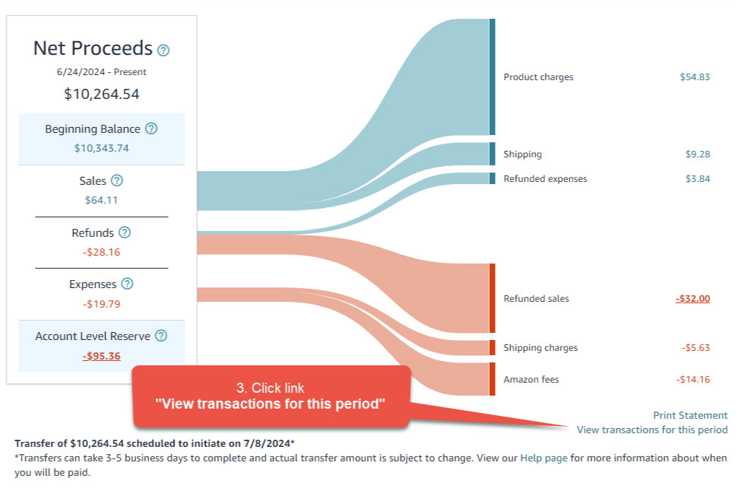
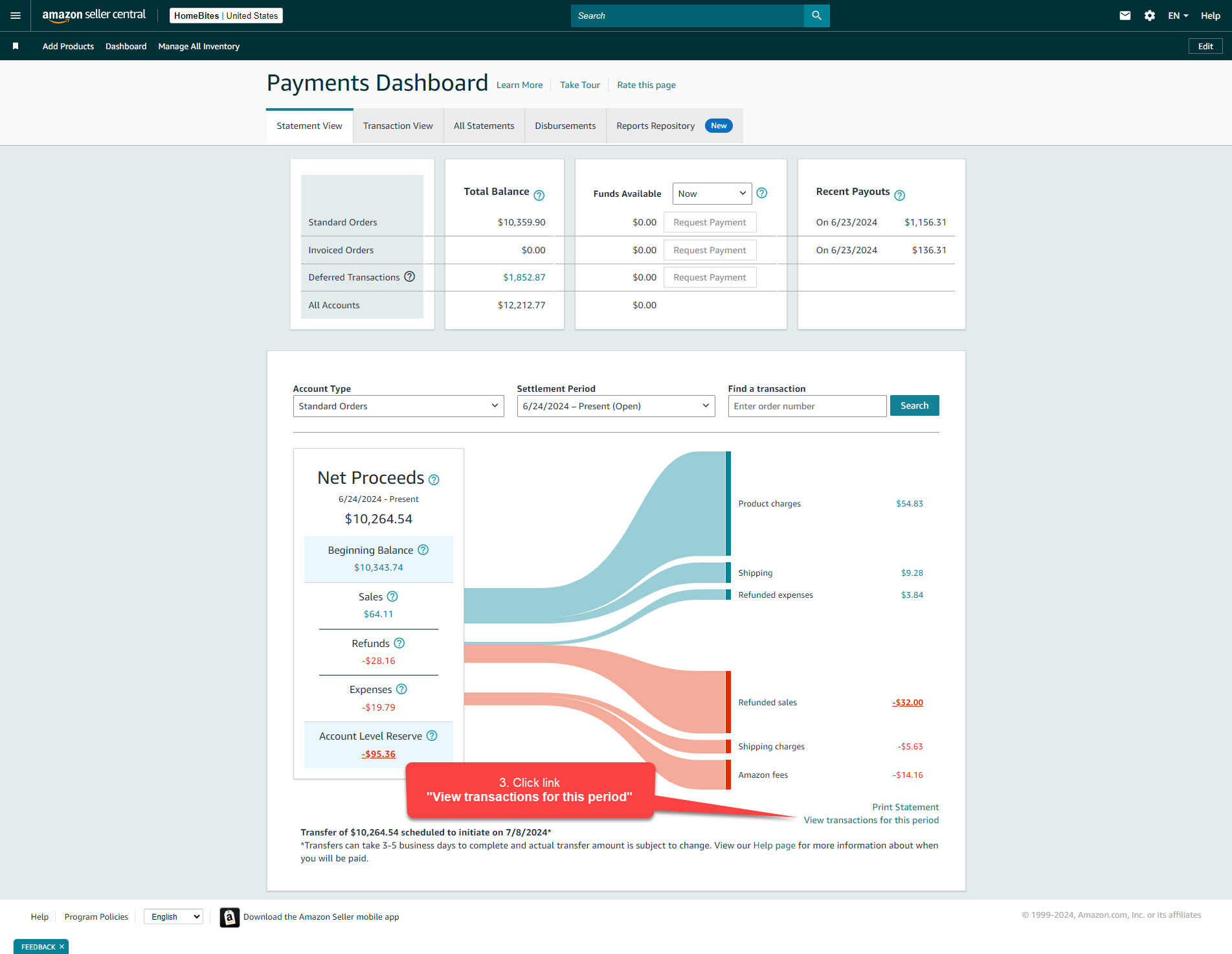
In Seller Central, go to the Payments reporting area and check ‘Statement View’. This section shows the amount being held and may also explain why the reserve is in place.
Then review:
-
Statement View for the account-level amount.
-
Transactions View for order-level activity.
-
Deferred transactions for proceeds with future payment dates.
-
Open A-to-z Guarantee claims and chargebacks.
-
Account Health and Performance Notifications.
-
Recent returns, refunds, fees, and settlement adjustments.
Regularly using Amazon’s reports and analytics can help you track changes in your reserve alongside refunds, claims, sales, inventory costs, and expected deposits.
What to Do When Funds Are Held

Begin by documenting the issue. Record the reserve amount, the date you first noticed it, the settlement period, the reason shown, affected transactions, screenshots, and any related case IDs.
Next:
-
Confirm whether the balance is under Account-Level Reserve or Deferred transactions.
-
Resolve open claims, chargebacks, or verification requests.
-
Review shipping performance, valid tracking, refunds, and Account Health.
-
Download the relevant settlement and transaction reports.
-
Open one clearly documented Seller Support case.
-
Ask Amazon to identify the policy basis, affected transactions, release criteria, and next review date.
-
Adjust inventory purchasing and advertising budgets until the funds become available.
When you contact support, use a clear process to document your Seller Support case. Do not open the same case multiple times unless you have new information to add.
A clear and concise case with specific dates, transaction details, screenshots, previous case IDs, and your requested actions makes it easier for support teams to help you.
Important Considerations
-
Reserve amounts and release times are different for each account.
-
Even with good Account Health, you can still have claims, chargebacks, or verification holds.
-
Plan your inventory and advertising spending based on your available disbursement balance.
-
Keep settlement reports, screenshots, and Seller Support case records.
-
Most reserves cannot be removed manually; the underlying issue must be resolved or reviewed by Amazon.
If you need help figuring out why Amazon is holding your funds, contact beBOLD Digital. We offer hands-on support with payments, Account Health, claims, reporting, and Seller Support through our Amazon account management services.
Frequently Asked Questions
Is an Amazon account-level reserve a penalty?
Not always. Usually, it is a temporary hold to cover possible financial obligations. However, a separate adjustment, refund, fee, or claim decision could still lower the final amount you receive.
Can FBA sellers have an account-level reserve?
Yes. Account-level reserves are not just for Fulfilled by Merchant orders. FBA sellers can also have funds held because of claims, refunds, chargebacks, performance issues, or an account review.
Why do I have both deferred transactions and an account-level reserve?
These two balances represent different payment situations. Deferred transactions are usually order proceeds waiting for their scheduled release date, while an account-level reserve covers wider account risks or obligations.
Can I manually remove the reserve?
Sellers usually cannot remove a legitimate reserve using a Seller Central setting. You need to find and fix the underlying reason or ask Seller Support to look into any unexplained hold.
What should I include in a Seller Support case?
Include the reserve amount, settlement period, date first observed, screenshots, affected order or transaction IDs, claim or chargeback information, previous case IDs, and a request for the exact reason and release criteria.








Comments