



An Amazon account on hold message can indicate an identity or payment review, a security concern, a listing restriction, a selling-account deactivation, or a reserve on disbursements. Read the exact notice first, identify what Amazon has restricted, and use the response channel named in Seller Central. Correct the stated issue and submit only the requested evidence. Prepare a Plan of Action only when Amazon’s appeal workflow calls for one.
First, Determine What Amazon Has Actually Restricted
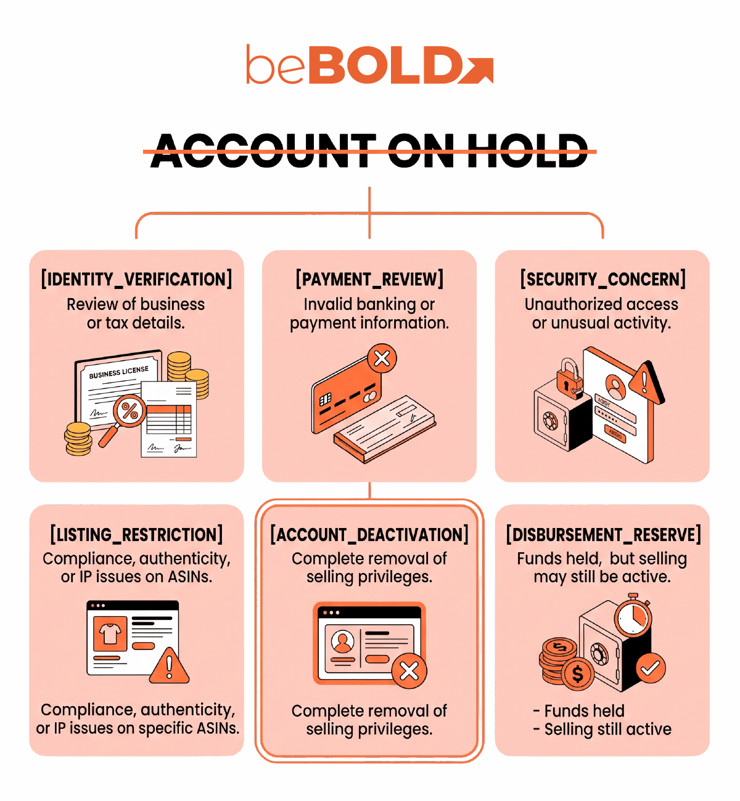
If you are asking why is my Amazon account on hold, do not assume that every hold is a suspension. “Account on hold” is informal language, not one standardized Seller Central enforcement status. It may describe several actions that require different responses.
This guide uses a restriction-classification framework: identify what is affected, verify the status in the correct Amazon interface, and then choose the matching response path. From beBOLD Digital’s perspective, classification should come before appeal writing.
|
What you see |
Likely issue |
Where to verify it |
Next action |
|
A warning in a retail Amazon account |
Customer-account security or payment review |
Amazon.com account messages and Customer Service |
Follow the customer-account verification instructions |
|
A verification request in Seller Central |
Identity, address, tax, banking, or business-information review |
Seller Central verification workflow and Account Info |
Submit the specific information requested |
|
One or more inactive ASINs |
Listing, restricted-product, authenticity, or compliance issue |
Account Health, Manage Your Compliance, or the relevant Performance Notification |
Correct the listing or provide product-level evidence |
|
Selling privileges removed |
Selling-account deactivation |
Account Health and Performance Notifications |
Follow the appeal option provided by Amazon |
|
Funds unavailable for disbursement |
Account-level reserve or payment review |
Payments Dashboard and reserve notification |
Review the reserve reason and applicable payment policy |
If the message appears only in a retail shopping account, use Amazon Customer Service guidance. If it appears in Seller Central, work through the applicable Performance Notification, Account Health page, verification process, or appeal workflow.
A disbursement reserve does not automatically mean that selling privileges have been removed. Amazon explains this separately in its account-level reserve guidance.
Why Amazon May Review or Restrict a Seller Account
Seller-account reviews can involve identity or business-verification discrepancies, unusual access, invalid payment information, performance problems, intellectual-property complaints, authenticity concerns, restricted products, product compliance, or conduct issues.
This list is only a diagnostic starting point. The seller’s actual notice determines the required response. Amazon’s seller guidance identifies performance, policy, and verification failures as common deactivation causes.
If Amazon keeps putting my account on hold, investigate recurring inconsistencies rather than resubmitting the same response. Check legal names, addresses, banking details, user permissions, unresolved performance issues, and whether product documentation matches the affected listings.
What to Do When Your Amazon Seller Account Is on Hold
If you are wondering how to get my Amazon account off hold, begin with the restriction classification above. There is no universal removal process.
1. Save the Exact Notice
Record the message, date, marketplace, case or notification ID, deadline, affected ASINs, cited policy, and requested action. Do not diagnose the problem from a paraphrased email or a screenshot missing context.
2. Secure the Account and Rule Out Phishing
.png?width=740&height=802&name=Blog%20Content__7_C%20(1).png)
Open Amazon or Seller Central directly instead of clicking a link in an unexpected email or text. The Federal Trade Commission’s Amazon impersonator guidance warns that scammers use suspicious-purchase and compromised-account messages and recommends contacting Amazon through information obtained directly from the company.
If unauthorized access may have occurred:
-
Change the account password.
-
Confirm that two-step verification is active.
-
Review secondary users, applications, and permissions.
-
Check business, banking, shipping, and return-address information for unauthorized changes.
Amazon also provides guidance on keeping Seller Central account information secure.
3. Use the Response Channel Named by Amazon
-
Complete identity or business checks through the verification workflow.
-
Address listing violations through Account Health or the applicable compliance page.
-
Respond to policy enforcement through Performance Notifications.
-
Use the appeal option shown for deactivation or listing removal.
-
Review payment-specific notices through the Payments Dashboard.
Seller Central enforcement and verification matters should be handled through the workflow named in the notice. Treat avoiding unrelated cases as workflow advice, not as an Amazon rule.
4. Correct the Root Cause Before Responding
Depending on the notice, corrective work could include reconciling business details, updating a payment method, correcting unsupported listing claims, removing a restricted product, addressing fulfillment failures, or obtaining the requested invoices or compliance documents.
A generic apology does not show that the underlying issue has been fixed.
5. Submit One Complete, Consistent Response
Confirm that the legal name, business entity, address, marketplace, dates, supplier information, ASINs, and document details agree. Submit relevant evidence and maintain a log of case IDs, dates, files, and Amazon replies.
For an Amazon account on hold temporarily, continue monitoring Seller Central for new instructions. “Temporary” does not establish a guaranteed resolution date.
If Amazon Requests an Appeal, Build It Around Evidence
A Plan of Action is not required for every hold. When Amazon requests one, address the root cause, the corrective action already completed, and the preventive controls that will reduce recurrence. Amazon’s deactivation guidance uses this three-part structure.
For detailed appeal development and reinstatement steps, read beBOLD Digital’s guide to the Amazon account reinstatement process.
Document QA Before Submission
Confirm that every file is:
-
Complete, legible, and current enough for the requirement
-
In the requested file type
-
Connected to the correct marketplace and legal entity
-
Consistent with the account name and address
-
Consistent with the relevant ASIN, product, and supplier
-
Free from unexplained edits or annotations
-
Submitted according to Amazon’s instructions for sensitive information
Important Considerations While the Account Is Under Review
-
Do not create another selling account to evade the restriction. Review Amazon’s Selling Policies and Seller Code of Conduct before making account-level changes.
-
Continue any order, refund, buyer-message, or compliance obligations Seller Central still permits.
-
Monitor Fulfillment by Amazon inventory and potential storage exposure.
-
Do not assume that every restriction treats funds or inventory identically.
-
Preserve a dated timeline of notices, submissions, files, and case IDs.
-
Involve qualified compliance or legal counsel when a notice concerns regulated products, safety, intellectual property, or legal allegations.
The honest answer to how long will my Amazon account be on hold is that there is no universal timeframe. The restriction type, requested evidence, response completeness, follow-up requests, and Amazon’s review process can all affect timing.
How to Reduce the Risk of Future Holds
Review Account Health and Performance Notifications regularly. Keep legal, tax, banking, and contact details consistent, preserve traceable invoices and compliance records, and control Seller Central user permissions.
Monitoring relevant Amazon seller metrics can also reveal operational problems before they create larger account-health consequences.
Get Help Diagnosing an Amazon Account Restriction
beBOLD Digital’s Amazon account management services can help sellers organize notices, identify operational issues, and coordinate corrective work. No service can guarantee reinstatement, but a focused response can reduce avoidable submission errors. Contact us today for more information.
 Frequently Asked Questions
How long does an Amazon seller account hold last?
There is no single reliable timeframe. Duration depends on the restriction, evidence requested, completeness of the response, follow-up requirements, and Amazon’s review process.
Is an Amazon account hold the same as a suspension or deactivation?
Not necessarily. “On hold” may describe a security or verification review, while deactivation refers to the removal of selling privileges. Check the exact Seller Central status.
Does every Amazon account hold require a Plan of Action?
No. Use a Plan of Action when Amazon’s appeal workflow requests one. Identity, banking, payment, or security reviews may require verification instead.
What happens to FBA inventory and seller funds during a hold?
Treatment varies according to the restriction, reserve policy, and account status. Review the applicable Seller Central notices rather than assuming one outcome applies to every hold.








Comments