



Amazon account reinstatement requires more than rewriting an appeal. Sellers should first determine whether Amazon deactivated the entire account, removed specific listings, or requested additional verification. Next, they should identify the operational root cause, complete corrective actions, collect accurate supporting evidence, and submit the requested response through Seller Central. A clear, case-specific response with verifiable documentation and practical preventive controls gives the appeal the strongest foundation, but Amazon retains full discretion over the final decision.
Before You Appeal: Identify What Amazon Actually Deactivated
Sellers frequently use “suspension” to describe any Amazon enforcement action. Amazon’s current guidance more often distinguishes between an account deactivation and a listing removal.
Account Deactivation vs. Listing Removal
An account deactivation removes or restricts your ability to sell through the affected account. A listing removal affects one or more product listings while other parts of the account may remain active.
This distinction changes the investigation:
-
An account-level action may involve performance, identity verification, related accounts, serious policy violations, or broader compliance concerns.
-
A listing-level action may relate to an individual ASIN, intellectual property complaint, product condition issue, restricted product, detail page violation, or missing compliance document.
-
A verification restriction may require identity or business documents instead of a written Plan of Action.
Do not assume every warning, listing restriction, or verification request follows the same appeal process.
Performance, Policy, Verification, and Related-Account Actions
Start with the deactivation notice in Performance Notifications. Record:
-
The policy or agreement provision Amazon cited
-
The affected ASINs, orders, marketplaces, or accounts
-
Any dates or response deadlines
-
Every document or explanation requested
-
The response options visible in Seller Central
-
Whether the notice asks for an appeal, questionnaire, verification, or additional evidence
Amazon may refer to Section 3 of the Amazon Services Business Solutions Agreement in certain account-level actions. Address Section 3 only when Amazon cites it. Do not add a generic Section 3 explanation to an unrelated appeal.
Amazon’s official instructions for appealing an account deactivation or listing removal should take priority over templates or third-party advice.
Amazon Reinstatement Triage Table
Use this table to decide what to investigate before preparing a response. The notice displayed in Seller Central always overrides general guidance.
|
Notice type |
Where to investigate |
Evidence that may be relevant |
Likely response pathway |
First action |
|
Performance metrics |
Performance Notifications, Account Health Dashboard, order reports, fulfillment records |
Order IDs, tracking events, refunds, carrier records, updated fulfillment procedures |
Account Health Dashboard appeal |
Identify the process failure behind the metric |
|
Product authenticity |
Performance Notifications, supplier records, inventory history |
Invoices meeting the notice requirements, supplier details, authorization records, supply-chain documentation |
Appeal button or document-upload flow |
Verify that the documents match the ASINs and quantities in question |
|
Intellectual property |
Account Health Dashboard, Rights Owner complaint, listing history |
Authorization or licensing documents, complaint retraction, listing revisions, correspondence |
Violation-specific appeal pathway |
Determine whether the complaint is valid, mistaken, or resolved |
|
Restricted product or compliance |
Compliance requests, listing details, product documentation |
Testing reports, certificates, registrations, label images, safety data sheets, corrected listing information |
Compliance dashboard or notice-specific submission |
Stop sales and identify the exact policy or document gap |
|
Identity or INFORM verification |
Account Information, verification workflow, Performance Notifications |
Government ID, bank or address records, tax information, business registration documents |
Verification workflow shown in Seller Central |
Make sure names and addresses match across documents |
|
Related accounts |
Performance Notifications, ownership records, user access, business relationships |
Ownership documents, explanation of the relationship, proof that the related account’s issue was resolved |
Account-level appeal pathway |
Identify every operational or ownership connection |
|
Listing-only removal |
Manage All Inventory, Account Health, Voice of the Customer, listing history |
Product images, listing changes, quality records, compliance documents |
Listing-level appeal or compliance flow |
Confirm that the rest of the selling account remains active |
Amazon can change its response workflows. Confirm the current pathway in the deactivation notice and Amazon’s official appeal instructions before submitting.
The Amazon Account Reinstatement Process, Step by Step
Step 1: Save and Analyze the Deactivation Notice
Download or copy the complete notice before making changes. Do not rely on memory or a shortened email preview.
Create a case file containing the notice, case ID, affected ASINs, order IDs, requested documents, submission history, and all communications with Amazon. This prevents different team members from submitting conflicting explanations.
Step 2: Diagnose the Operational Root Cause
The violation named in the notice is not always the root cause.
For example, a high Late Shipment Rate is the observed outcome. The root cause could be an incorrect handling-time setting, a failed warehouse handoff, inventory being available in Seller Central when it was not physically available, or the absence of an exception-reporting process.
Depending on the notice, review:
-
Performance Notifications
-
The Account Health Dashboard and Account Health Rating
-
Voice of the Customer
-
Order and fulfillment records
-
Supplier and invoice files
-
Product compliance records
-
Listing contribution and change history
-
User Permissions and related-account relationships
The Amazon seller dashboard can help teams locate the reports and notifications needed for this investigation.
Step 3: Gather Evidence That Matches the Notice
Do not overwhelm the reviewer with unrelated files. Each attachment should answer a specific request or support a specific statement.
For an authenticity complaint, Amazon may request invoices or supply-chain records. For verification, it may require identity, bank, tax, or business information. For a fulfillment problem, order records, tracking events, refunds, and revised operating procedures may be more relevant.
Invoice date, quantity, supplier-information, and file-format requirements depend on the violation and the instructions shown in the notice. Review Amazon’s current invoice requirements for appealing a policy violation and then follow the requirements in your own case.
Never modify an invoice, fabricate a supplier relationship, or submit documents that do not correspond to the affected products.
Step 4: Write the Explanation or Plan of Action Amazon Requested
If Amazon asks for a Plan of Action (POA), organize it around three elements:
-
The root cause of the violation
-
The corrective actions already completed
-
The preventive controls that will reduce recurrence
If the response screen requests documents, an appeal questionnaire, or identity verification instead, complete that process. Submitting an unsolicited POA will not necessarily address a document or verification failure.
Step 5: Submit Through the Designated Seller Central Pathway
Use the button or workflow connected to the notice in Seller Central. Depending on the case, this may be available through Performance Notifications, the Account Health Dashboard, a compliance request, or a dedicated verification screen.
Amazon’s recent moderator guidance also directs eligible sellers to Account Health Support through the “Call Me Now” option on the Account Health page. Account Health Support may help clarify the violation and response requirements, but it does not guarantee approval. Amazon’s deactivation and reinstatement guidance provides a current Amazon-authored reference for this pathway.
Avoid sending appeals to outdated email addresses or opening unrelated duplicate cases.
Step 6: Review Amazon’s Response Before Submitting Again
If Amazon asks for more information, compare its response with your previous submission line by line.
Determine:
-
Which question remains unanswered
-
Whether a document was missing, unreadable, inconsistent, or outside the requested period
-
Whether the root cause was too vague
-
Whether a claimed corrective action lacked evidence
-
Whether the preventive controls were specific enough
Do not immediately resend the same appeal. A revised submission should contain a meaningful new explanation, action, or piece of evidence.
What Should an Amazon Plan of Action Include?
A strong POA is specific, factual, and easy to verify. It should not be emotional, argumentative, or padded with promises.
Root Cause: Explain the Process Failure
Weak wording:
Our Order Defect Rate increased because several customers complained.
Improved hypothetical wording:
The root cause was the absence of a daily exception review for merchant-fulfilled orders. Between May 4 and May 9, seven orders remained open after the carrier failed to collect them, but no employee was assigned to review unshipped orders before the handling-time cutoff.
The improved version identifies the failed process, affected period, and operational gap.
Corrective Actions: Document What Is Already Complete
Corrective actions should describe completed work, such as:
-
Refunding affected orders
-
Pausing affected listings
-
Removing questionable inventory
-
Correcting product information
-
Ending a supplier relationship
-
Updating handling times
-
Completing requested verification
-
Obtaining required compliance records
Include dates, ASINs, order IDs, and supporting records when they are relevant and accurate.
Preventive Measures: Assign Controls, Owners, and Frequency
“We will be more careful” is not a control.
A stronger preventive measure identifies:
-
The new procedure
-
The person or team responsible
-
How often the control runs
-
The record that proves completion
-
What happens when the control detects a problem
For example:
The operations manager now reviews the unshipped-orders report at 9:00 a.m. and 3:00 p.m. each business day. Orders approaching the handling-time cutoff are escalated to the fulfillment lead and recorded in the shipping exception log.
This is a hypothetical example, not a copy-and-paste POA. Your submission must reflect what actually happened and what your company has genuinely implemented.

Check the Quality of Your Evidence Before Submitting
The triage table identifies the types of evidence that may be relevant. Before uploading anything, apply five checks:
-
Relevance: Does the document answer a specific request in the notice?
-
Coverage: Does it cover the affected ASINs, orders, accounts, quantities, and dates?
-
Consistency: Do names, addresses, product identifiers, and business details match across the evidence and Seller Central?
-
Authenticity: Is the file complete, legible, unaltered, and traceable to its issuer?
-
Explanation: Does the appeal make clear what the document proves?
For identity verification, Amazon may ask for government identification, business records, address evidence, tax information, or bank details. Amazon’s current seller identity-verification checklist stresses document clarity and consistent account information. Always follow the exact request in your notice. More files do not compensate for the wrong evidence.
What Should You Do If Amazon Denies the Appeal?

A denial does not automatically mean the account can never be reinstated. It means the submission did not resolve Amazon’s concern or that Amazon requires more information.
Before responding again:
-
Read Amazon’s message literally.
-
Preserve the complete case and submission history.
-
Compare the requested information with what you supplied.
-
Investigate any newly identified issue.
-
Do not repeat the same POA with superficial wording changes.
-
Contact Account Health Support when that option is available.
-
Seek specialized operational or legal help when the facts require it.
The objective is not to submit more appeals. It is to submit a response that resolves the remaining evidentiary or operational gap.
Important Considerations Before You Submit
-
Do not create another account to circumvent a deactivation.
-
Do not submit false admissions simply to make an appeal sound cooperative.
-
Never alter invoices or other supporting records.
-
Preserve original copies of notices, documents, and case communications.
-
Follow Amazon’s Selling Policies and Seller Code of Conduct, including its rules governing multiple selling accounts. Amazon’s multiple-account guidance explains that an issue on one associated account can affect other accounts.
-
Treat account reinstatement and funds-disbursement eligibility as separate issues.
-
Do not assume an account-level action can be fixed only by editing a listing.
-
Consider qualified legal advice for genuine intellectual property, fraud, contractual, or funds disputes.
After Reinstatement: Build a 30-Day Account-Health Plan
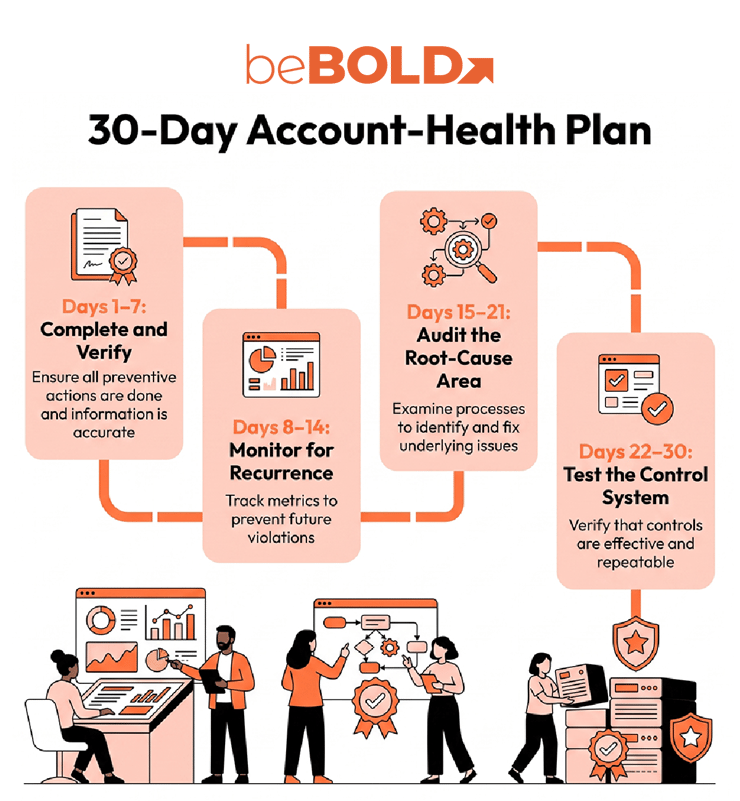
Having an Amazon account reinstated restores selling access, but it does not finish the remediation work. The first 30 days should confirm that every commitment in the appeal has become a functioning business control.
Days 1–7: Complete and Verify
-
Complete any remaining preventive action promised in the appeal.
-
Assign an owner and completion date to every control.
-
Confirm that affected listings, inventory, and account information are accurate.
-
Save proof that the corrective work was completed.
Days 8–14: Monitor for Recurrence
Review Account Health, Performance Notifications, Voice of the Customer, fulfillment exceptions, and unresolved violations. Use an Amazon seller metrics optimization process to identify negative trends before they become another enforcement issue.
Days 15–21: Audit the Root-Cause Area
Audit the supplier, listing, fulfillment, verification, or compliance process that caused the original problem. Check that employees are following the revised procedure and that exception handling is documented.
Days 22–30: Test the Control System
Verify that each control has:
-
A responsible owner
-
A defined review frequency
-
An escalation threshold
-
A record of completion
-
A backup owner
The goal is to replace a one-time appeal fix with a repeatable control system that reduces the account’s long-term enforcement risk.
Should You Use an Amazon Reinstatement Service?
An Amazon account reinstatement service may help organize an investigation, identify evidence gaps, or improve the clarity of a response, but it cannot control Amazon’s decision. Before hiring a provider, ask whether it will:
-
Diagnose the exact notice instead of supplying a generic template
-
Explain which evidence supports each statement
-
Protect confidential account and supplier information
-
Avoid false guarantees, altered documents, or unnecessary admissions
-
Help translate promised preventive measures into real operating controls
The same standards apply when comparing Amazon seller account reinstatement services. A credible provider should explain its process and limitations clearly. It should never promise a guaranteed outcome or ask the seller to submit information that is incomplete or untrue.
Need Help Strengthening Amazon Account Operations?
A generic appeal cannot compensate for an incorrect diagnosis. Whether an appeal is handled internally or with outside support, the underlying catalog, compliance, supplier, fulfillment, and account-health processes still need to be corrected.
beBOLD Digital’s Amazon account management services support healthier marketplace operations, including ongoing catalog, performance, and account-health oversight. Contact our team today!
Frequently Asked Questions
Is an Amazon appeal the same as account reinstatement?
No. An appeal is the seller’s request for Amazon to reconsider an enforcement action. Reinstatement is the outcome if Amazon accepts the response, evidence, or verification.
What if Amazon’s notice does not request a Plan of Action?
Follow the workflow shown in the notice. Some cases require documents, identity verification, a questionnaire, or another notice-specific response instead of a traditional Plan of Action.
Can I open another Amazon seller account after deactivation?
Do not create another account to avoid enforcement. Amazon’s standard policy allows one Seller Central account per seller, although multiple accounts may be permitted for legitimate business needs. An enforcement issue on one associated account can affect the others, so review the current policy and resolve the original deactivation first.
Can anyone guarantee Amazon account reinstatement?
No. Amazon makes the final decision. A service provider may help diagnose the issue, organize evidence, or improve the response, but it cannot guarantee approval or control Amazon’s review.
When should an Amazon seller consult an attorney?
Consider qualified legal advice when the case involves intellectual property ownership, fraud allegations, contractual disputes, significant funds issues, or another genuine legal question. Routine operational or performance appeals do not automatically require an attorney.
How long does Amazon account reinstatement take?
There is no reliable universal reinstatement timeline. Amazon’s current moderator guidance says sellers should allow up to 72 hours for an appeal to be reviewed, but an initial review is not the same as full reinstatement. Requests for additional information, complex verification, intellectual property disputes, and related-account investigations can extend the process.









Comments