


To calculate Amazon 2026 holiday fees, multiply your SKU’s published peak FBA fulfillment rate by 1.035 to include the fuel surcharge, unless already included. Multiply that amount by forecast units shipped during the peak window, then add other applicable selling costs separately. This SKU-level planning is part of a broader holiday strategy that beBOLD’s Amazon account management services can help you manage. To isolate the holiday-only fulfillment increase, calculate (peak rate − non-peak rate) × 1.035 using matching product classifications.
What Amazon’s 2026 Holiday Fee Announcement Changes

Amazon’s 2026 FBA announcement affects several parts of holiday planning. The key changes are:
-
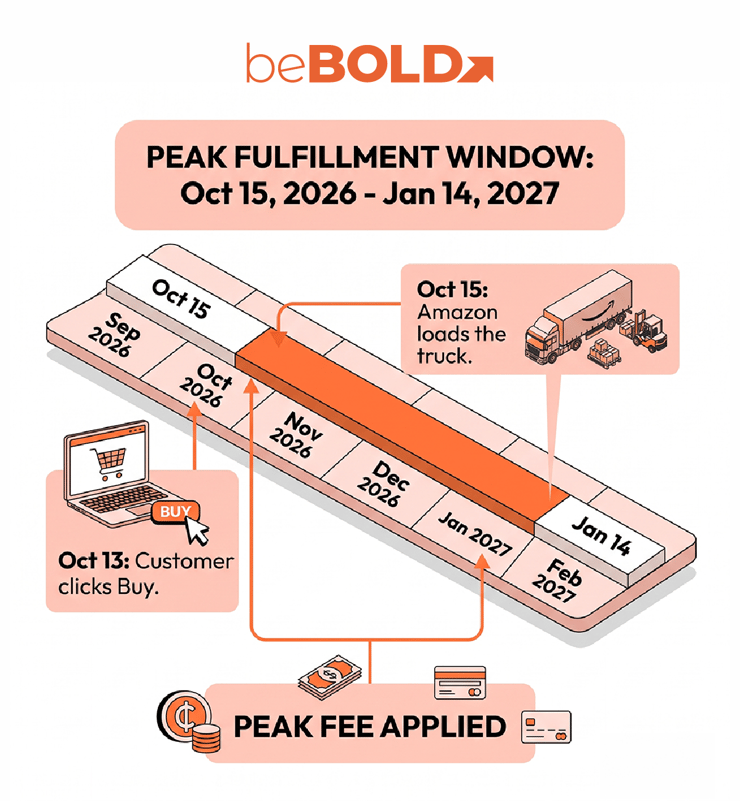
Holiday peak fulfillment period: Peak rates apply from October 15, 2026, through January 14, 2027. The announcement also covers Remote Fulfillment with FBA into Canada and Mexico, Multi-Channel Fulfillment (MCF), and Buy with Prime. Each program has its own pricing; the calculations below use US FBA rates.
-
SKU-level fee increases: Amazon reports an average seasonal increase of $0.32 per unit, but that is not a flat charge. Your actual increase depends on the product’s classification, size tier, shipping weight, and price band.
-
Fuel and logistics surcharge: A 3.5% surcharge began April 17, 2026, for US FBA and applies to peak fees. Amazon’s published rate cards exclude this charge, while its Revenue Calculator, Profit Analytics dashboard, and Fee and Economics Preview reports have been updated to reflect peak rates and the surcharge.
-
Annual fee changes already included: Changes effective January 15 are already built into the 2026 rate cards. For broader context, see Amazon’s 2026 fee changes; do not add those annual increases to the rates again.
For beBOLD Digital, these changes should inform one SKU-level planning model for holiday pricing, inventory commitments, and PPC. A fee forecast becomes useful when it shows the team which promotion it can afford and how much it can spend acquiring each sale.
How to Protect Margins From Amazon Holiday Fees
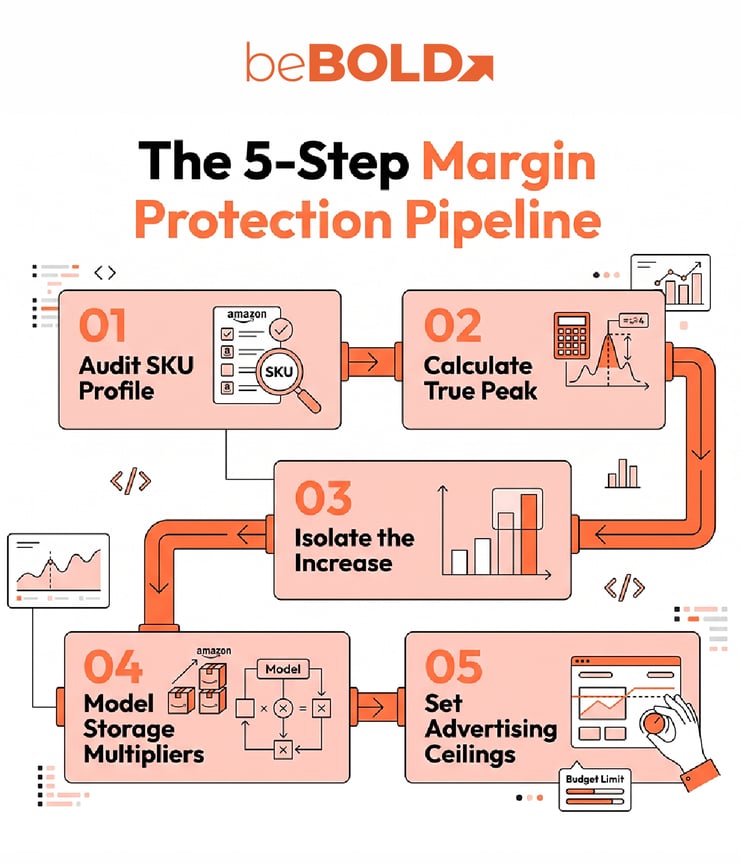
Step 1: Identify the Correct Rate for Each SKU
Use the product’s final packaged dimensions, weight, price, and Amazon classification. Record one row per SKU and fulfillment program.
|
Input |
What to verify |
|
ASIN and seller SKU |
Exact product and offer |
|
Fulfillment program |
US FBA or another service |
|
Category and size tier |
Non-apparel, apparel, dangerous goods, and assigned tier |
|
Shipping weight |
Unit or dimensional weight |
|
Selling price |
Applicable fee band |
|
Peak and non-peak rates |
Matching 2026 rate-card rows |
|
Surcharge treatment |
Whether each source includes the surcharge |
|
Forecast units |
Shipments during the peak window |
|
Other adjustments |
Discounts, charges, or exemptions |
Check price bands and dimensional weight
Amazon uses three price bands: below $10, $10–$50, and above $50. Exactly $10 and $50 fall in the middle band.
For most larger products, Amazon uses the greater of unit or dimensional weight. Small standard products and extra-large products over 150 pounds use unit weight.
Dimensional weight in pounds = packaged length × width × height ÷ 139
Amazon applies minimum two-inch width and height measurements to certain bulky and extra-large products. Confirm the final classification in Amazon’s fee guidance. Beauty brands should also verify dangerous-goods status.
Step 2: Calculate Peak Fulfillment Cost
Using Amazon’s published rate card:
Peak fulfillment cost = peak rate × 1.035
The peak rate already includes the seasonal increase. Do not add $0.32 or the non-peak rate again. If Amazon’s calculator or report already includes the surcharge, do not multiply by 1.035 again.
Selected Amazon peak fulfillment fees
These non-apparel rates apply to the $10–$50 price band and exclude product-specific adjustments.
|
Product classification |
Non-peak rate |
Peak rate |
Peak cost with surcharge |
|
Small standard, over 2 through 4 oz |
$3.42 |
$3.61 |
$3.74 |
|
Large standard, over 8 through 12 oz |
$4.20 |
$4.48 |
$4.64 |
|
Large standard, over 1.75 through 2 lb |
$5.82 |
$6.15 |
$6.37 |
Source: Amazon’s 2026 US FBA rate cards. Final-column amounts include fulfillment and the fuel surcharge only.
For a hypothetical $30 facial moisturizer measuring 8 × 4 × 3 inches and weighing 10 ounces:
-
Dimensional weight: 96 ÷ 139 = approximately 11.05 ounces.
-
Assumed classification: large standard, non-apparel, and not dangerous goods.
-
Peak fulfillment cost: $4.48 × 1.035 = approximately $4.64 per unit.
-
At 20,000 peak units: approximately $92,736.
Confirm Amazon’s recorded measurements and classification before budgeting.
Step 3: Isolate the Holiday Increase
Holiday-only increase per unit = (peak rate − non-peak rate) × 1.035
For the moisturizer:
|
Calculation |
Amount |
|
Non-peak cost: $4.20 × 1.035 |
$4.3470 |
|
Peak cost: $4.48 × 1.035 |
$4.6368 |
|
Holiday-only increase per unit |
$0.2898 |
|
Increase at 20,000 units |
$5,796 |
This isolates the seasonal increase without confusing it with the surcharge. For catalog planning, multiply each SKU’s increase by its forecast peak shipments and use a weighted average when needed.
Step 4: Add Storage and Other Costs
FBA holiday fulfillment fees are only one part of the margin forecast. Track fulfillment, storage, referral fees, logistics, returns, promotions, and advertising separately.
Calculate storage from inventory held
Monthly storage cost = average daily units stored × packaged cubic feet per unit × monthly rate
Packaged cubic feet = length × width × height ÷ 1,728
Use the applicable rate from Amazon’s monthly storage fee schedule.
For 600 average daily units of the moisturizer at $2.40 per cubic foot:
-
Packaged volume: 96 ÷ 1,728 = approximately 0.05556 cubic feet.
-
Average stored volume: approximately 33.33 cubic feet.
-
Monthly storage estimate: approximately $80.
If 1,000 units sell that month, allocating storage across sales gives $0.08 per unit for planning. This is a management allocation, not Amazon’s billing method. Aged-inventory charges are additional. See our guide to Amazon FBA storage fees.
Keep conditional charges visible
|
Cost |
Forecast treatment |
|
Referral fees |
Apply category rules, minimums, and tiers |
|
Inbound and placement |
Allocate across units received |
|
Storage and aged inventory |
Model inventory and age by month |
|
Low-inventory-level fee |
Check eligibility and exemptions |
|
Returns and refunds |
Estimate net losses from SKU history |
|
Deals and coupons |
Include fixed and variable fees |
|
Packaging and handling |
Check SIPP and other rules |
|
Advertising |
Model separately |
Amazon’s fulfillment fee guide lists separate apparel, dangerous-goods, SIPP, low-inventory-level, and Overmax rules. Do not apply the 3.5% surcharge to selling price or total operating costs.
Step 5: Set Promotion and Advertising Limits
Determine how much each SKU can spend acquiring a sale while preserving its target contribution.
Contribution before advertising = sales after discounts − product cost − fulfillment − referral fees − returns allowance − other attributable costs
Advertising allowance = contribution before advertising − target contribution
For the $30 moisturizer, assume a 15% referral fee, one unit per order, and no additional fulfillment adjustments:
|
Per-unit item |
Regular price |
10% discount |
|
Sales before refunds |
$30.00 |
$27.00 |
|
Product cost |
−$8.00 |
−$8.00 |
|
Referral fee |
−$4.50 |
−$4.05 |
|
Peak fulfillment |
−$4.64 |
−$4.64 |
|
Inbound and placement |
−$0.60 |
−$0.60 |
|
Allocated storage |
−$0.08 |
−$0.08 |
|
Returns allowance |
−$0.75 |
−$0.75 |
|
Promotion fees |
−$0.30 |
−$0.30 |
|
Contribution before advertising |
$11.13 |
$8.58 |
|
Target contribution |
$6.00 |
$6.00 |
|
Advertising allowance |
$5.13 |
$2.58 |
|
ACoS ceiling |
17.1% |
9.6% |
Amounts are rounded. The calculation uses a $4.6368 fulfillment cost.
The regular-price offer can spend approximately $5.13 per sale while retaining the $6 contribution target. The discounted offer can spend approximately $2.58. These amounts are not net income and must still support overhead and profit.
The discount reduces contribution available for advertising by $2.55 because fulfillment costs remain in the same fee band. Reforecast storage, returns, and volume if the promotion changes demand.
Translate the allowance into a campaign decision
Planning CPC ceiling = advertising allowance per order × conversion rate
At a 10% conversion rate, the example supports approximately $0.51 per click at regular price and $0.26 at the discounted price. Use actual campaign conversion rates and order mix before setting bids. Our guide to analyzing Amazon PPC data explains how to assess campaign performance. Use those findings to inform your holiday Amazon PPC planning.
Decide what changes before approving spend
|
Finding |
Next action |
|
Discounted offer cannot support planned ad spend |
Reduce the discount or acquisition cost |
|
Amazon estimate differs from the worksheet |
Recheck dimensions, weight, classification, and surcharge |
|
Gift packaging raises fulfillment cost |
Recalculate the completed set |
|
Slower sales increase storage per unit |
Reduce inbound quantity or adjust replenishment |
|
Offer meets the target |
Set monitoring thresholds before scaling |
Reusable worksheet formulas
|
Output |
Calculation |
|
Peak fulfillment |
Inclusive peak rate, or peak rate × 1.035 |
|
Non-peak fulfillment |
Inclusive non-peak rate, or non-peak rate × 1.035 |
|
Holiday-only increase |
Inclusive peak cost − inclusive non-peak cost |
|
Peak fulfillment budget |
Inclusive peak cost × forecast peak shipments |
|
Holiday budget increase |
Holiday-only increase × forecast peak shipments |
|
Advertising allowance |
Contribution before advertising − target contribution |
|
ACoS ceiling |
Advertising allowance ÷ attributed revenue per order |
If the advertising allowance is zero or negative, the offer cannot support positive ad spend while meeting the target. Revisit the price, costs, or contribution goal before setting bids.
Important Considerations Before Finalizing Your Holiday Budget
Before finalizing your holiday budget, review these factors to avoid underestimating fulfillment, storage, or advertising costs:
-
Plan inventory early, but account for storage: Amazon recommends sending inventory in early because fulfillment-center capacity may tighten. Compare the benefit of availability with storage costs as part of your Amazon inventory management, and remember that early arrival does not prevent peak fees if orders ship during the peak window.
-
Recalculate bundle costs: Gift sets can change dimensions, shipping weight, price bands, and handling requirements. For example, increasing the moisturizer package from 8 × 4 × 3 inches to 8 × 5 × 4 inches raises dimensional weight from about 11.05 to 18.42 ounces. Compare the complete bundle’s fees, product costs, and expected returns before approving it.
-
Check fees after discounts: Discounts can move products into different fee bands. A price change from $52 to $46.80 crosses the $50 threshold, while $10 to $9.99 crosses the lower boundary. Verify the applicable rate and promotion treatment in Seller Central.
-
Forecast shipments by date: Separate shipments before, during, and after the peak period: October 1–14, October 15–31, November, December, and January 1–14. Apply peak rates only to shipments that qualify, and track storage costs monthly.
-
Keep the fuel surcharge in your budget: Amazon’s 3.5% fuel and logistics surcharge remains active until further notice. Include it in your forecast and update your calculations if Amazon announces a change.
Frequently Asked Questions
Do orders placed before October 15 avoid peak fulfillment fees?
No. Amazon uses the date the shipment leaves its fulfillment center. An earlier order can incur peak fees if it ships during the October 15, 2026–January 14, 2027 window.
Should I keep the same ACoS target during a holiday promotion?
Recalculate it first. A lower selling price can reduce the contribution available for advertising, even when fulfillment costs remain unchanged. Use the promotional price, applicable fees, expected returns, and target contribution to establish the new allowance.
What if Amazon’s fee estimate differs from my worksheet?
Check the price band, packaged dimensions, shipping weight, apparel or dangerous-goods classification, and whether the estimate already includes the surcharge. Also inspect product-specific adjustments. Amazon’s guide directs sellers to its FBA Remeasurement and Reimbursement Tool when incorrect measurements may have caused incorrect charges.
Can I use these US FBA rates for MCF or Buy with Prime?
No. Use the relevant program’s current rate card and surcharge treatment. The shared holiday announcement does not make the services’ fulfillment prices interchangeable.
Does switching to seller fulfillment guarantee savings?
No. Compare the complete alternative: pick-and-pack labor, packaging, carrier charges, seasonal surcharges, storage, returns, and delivery performance. A lower shipping quote alone does not establish a more profitable fulfillment method. Our Amazon FBA vs. FBM comparison explains the broader tradeoffs between fulfillment methods.
beBOLD Digital’s Take: Set the Margin Limit Before Scaling Holiday Sales
Holiday fee planning should end with an approved offer and acquisition-cost limit for each priority SKU. Start with the ASINs receiving the largest inventory and promotional commitments, then compare regular-price, discounted-price, and slower-sales scenarios.
Give the account, catalog, operations, and PPC teams the same assumptions. Review actual fees and contribution against the forecast as orders ship, and adjust the offer or campaign when the economics change.
Through Amazon account management, beBOLD Digital can help connect these decisions across your marketplace strategy. Talk to our team about reviewing your priority ASINs, promotional prices, inventory commitments, and advertising limits before increasing holiday spend.









Comments