


Bundle Manager is a tool that lets you create, maintain, and remove virtual bundles for your products. To use Bundle Manager, you must own your brand, be registered through the Brand Registry, and be supported by Amazon Vendor Services.
Bundle Manager is a tool that lets you create, maintain, and remove virtual bundles for your products. To use Bundle Manager, you must own your brand, be registered through the Brand Registry, and be supported by Amazon Vendor Services.
Virtual bundles group a collection of related components into one virtual ASIN and help customers discover and buy complementary products and accessories. Virtual bundles provide a single detail page and checkout experience for the customer and increase the number of items in the customer’s cart.
What are Virtual Bundles and How Do They Work?
A virtual bundle is a collection of products sold together as a package, but unlike traditional bundles, the products are not physically packaged together. Instead, Amazon lists them as a single bundle under one ASIN, allowing you to group complementary products.
This approach lets you market multiple items together while keeping inventory separate for easier management. Customers enjoy the convenience of purchasing related products at a discounted price, while sellers can boost sales by offering value and a streamlined shopping experience.
How Do Virtual Bundles Work?
Here’s how Virtual Bundles work:
-
Create the Bundle: Sellers choose complementary products and list them as a single bundle under one ASIN.
-
Display: The bundle shows up on the product page, with all items listed together, often at a discounted price.
-
Inventory: Each product in the bundle remains in its own inventory, offering more flexibility than traditional bundles.
-
Purchase: When a customer buys the bundle, they get all the products, but each item is shipped separately.
Where Do Virtual Product Bundles Appear?
Virtual Bundles are strategically placed on the Product Detail Page, offering key advantages for Amazon sellers:
-
Prime Placement: The “Make it a bundle” feature is positioned right below the main product listing, ensuring it captures customer attention when they're most likely to make a purchase.
-
Above Sponsored and Enhanced Content: Bundles are displayed above sponsored listings and A+ Content, which helps increase visibility. This prime placement encourages customers to purchase multiple items together, driving up the overall order value.
-
Attractive Design and Convenience: The layout for virtual bundles is clear and appealing, showing all the bundled items together. This design makes it easy for customers to see the value of buying the set, making it more likely they'll add it to their cart.
Seller Eligibility and Requirements for Virtual Bundles
Creating virtual bundles on Amazon requires sellers to meet specific eligibility criteria, including Brand Registry enrollment. This ensures that only authorized brand owners can create bundled listings.
-
First, you must be enrolled in Amazon Vendor Central and have access to the "Bundle Manager" tool.
-
Additionally, the products selected for the bundle must comply with Amazon's bundling guidelines.
-
Some product categories or types may not qualify for bundling, so it's important to review Amazon's policies before creating your bundle.
Professional Seller Account: Sellers must have a professional account on Amazon Seller Central. Individual accounts are not eligible for Virtual Bundles.
Brand Registry Enrollment: Sellers must be enrolled in the Amazon Brand Registry to create Virtual Bundles.
Fulfilled by Amazon (FBA): All products included in a Virtual Bundle must be fulfilled through Amazon’s FBA program.
Active Listings: Each item in the bundle must have an active listing with inventory available.
Physical Products Only: Only physical products are eligible for bundling; digital items cannot be included.
Eligible Categories: Products must belong to categories that allow Virtual Bundles, as restricted categories may not support this feature.
Compliance with Policies: Sellers must comply with Amazon's policies on bundling, which prohibit misleading customers or bundling unrelated items.
Product Variants: Each bundle must contain unique SKUs; the same product variant cannot appear multiple times in a single bundle.
High-Quality Images: Bundles require a clear, high-quality primary image showing all items in the bundle.
How to Create a Virtual Bundle?
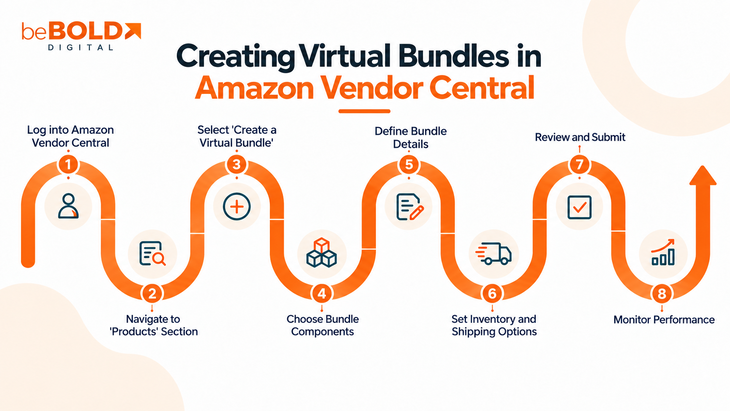
When you create a virtual bundle, you can add or remove components and adjust their quantity. You can also define images and attributes for the bundle.
-
Use the search bar and filters to choose a base product and component products for your bundle from your product catalog. The base product is usually the most expensive or most high-velocity ASIN in your bundle.
-
Upload content for your bundle and add details such as title, short title, and bullet points.
Use the following guidelines when you create a bundle:
-
A virtual bundle must contain two to five different ASINs. Each ASIN can have a quantity of up to 25. Each component ASIN must be buyable on its own. You cannot create multipacks (multiple units of the same product) or “buy-box” items (single ASINs shipped in multiple boxes). To include multiple units of an ASIN in a bundle, select the ASINs and adjust the quantity by clicking on the up and down arrows below the product description.
-
You can only create a bundle for products for which you are the registered brand owner in the Brand Registry.
-
Bundles must consist of items that are either compatible or highly complementary. This means items in the bundle enable or enhance the use of other items in the bundle or provide convenience to the customer when they are bought together.
-
Bundles must consist of a unique combination of ASINs. You will receive an error message if you try to bundle items that already exist as a bundle.
-
Do not include generic products in a bundle, as it may mislead customers into thinking that the generic product belongs to the same brand as one of the branded products in the bundle. Generic products are identified as items with no brand whatsoever on the product or packaging. This is not the same thing as brands with low customer brand awareness.
-
New virtual bundles can take up to 24 hours to be available on the website.
-
New bundles will be automatically merchandised on the detail page of the base ASIN.
-
If a base ASIN already has six virtual bundles created, new virtual bundles can no longer be featured on the detail page of the base ASIN.
Read the virtual bundle policy for further guidelines and definitions.
How to Edit and Remove a Virtual Bundle?
After you create a virtual bundle, you can edit the attributes for the existing bundle or remove the bundle. Changes can take up to 24 hours to reflect on the website.
- Go to Bundle Manager and search for the virtual bundle you want to edit or remove using the search bar and the filters.
- Select Action to open the menu or select multiple virtual bundles using the check boxes next to them.
- Once a bundle is created, you may not modify its components. If you want to add or remove products from the bundle, you must create a new bundle listing or delete it and re-create it in Bundle Manager.
- After a bundle has been saved, you can only edit the title and bullet points of a bundle ASIN in Bundle Manager. Changes can take up to 24 hours to reflect on the website. The bundle cannot be edited again until the previous edits have been processed.
- You can manage bundle images by going to Items and selecting Upload images.
Bundle Listing and Categorization
-
The base ASIN helps determine the search and browse categorization of the bundle. A bundle ASIN inherits search keywords from its base ASIN.
-
If a bundle includes products from multiple categories, it may only be listed in the category of the base ASIN.
-
A bundle can be composed of different branded items. However, the bundle itself should be branded according to the highest-priced item in the bundle.
Bundle Titles
The bundle title length must align with title length rules in product title requirements, which allows a maximum title length of 200 characters, including spaces. If the bundle only includes a few items, list them in the title. For example:
FORMAT
[Main product title] with [Bundle component product titles]
ACTUAL EXAMPLE: Brand X C143 12MP Digital Camera with Rechargeable batteries & Carrying case - Blue"
If the bundle includes many items, list the primary and secondary items in the title, along with the total number of items in the bundle. In these cases, the entire bundle component information must be listed in the bullet points in the bundle details. For example:
FORMAT
[Main product title] + “with” + [Bundle component summary] + “(# Items)”
ACTUAL EXAMPLE: "Brand X Guitar with Bag, Stand, and Accessories (11 Items)"
Bundle short title
The bundle's short title is shown on the detail page of the base ASIN, and it helps customers understand the contents of the bundle. Short title length is limited to 55 characters, including spaces. For example:
FORMAT
with [Bundle component product titles]
ACTUAL EXAMPLE: "with Rechargeable batteries and Carrying case - Blue"
Bundle Product Details and Images
-
Feature bullet 1 on a bundle detail page must state that the product is a bundle of "X" number of items and must identify the products in the bundle. A minimum quantity of three bullet points is recommended.
-
Additional bullet points must describe the products in the bundle with appropriate designators, such as model number, color, and size.
-
The main image for the bundle must include the specific products in the bundle, must not include any items that are excluded from the bundle, and needs to be in line with Amazon’s product image requirements. Images of representative or similar products are not permitted.

Pricing Your Virtual Bundles
When pricing your Amazon virtual bundles, it's crucial to strike a balance between offering an attractive bundle price deal for customers and maintaining healthy profit margins.
Since virtual bundles combine multiple products into one listing, consider the total cost of the individual products and how much of a discount you can offer without compromising profitability.
A good strategy is to price the bundle slightly below the sum of the individual prices for each item, making it more appealing. Keep in mind that Amazon charges fees for the bundle, including referral fees based on the category of the base ASIN.
Regularly monitor competitor bundles to ensure your bundle price is competitive while still offering value. Also, adjust your pricing based on performance data, seasonal trends, and any changes in inventory costs.
How to Manage Orders and Returns for Virtual Bundles?
Managing orders and returns for virtual bundles on Amazon can differ from handling individual product listings since the bundle includes multiple items under a single SKU.
When a customer buys a virtual bundle, each item is shipped separately via Amazon’s fulfillment network. If a return is requested, customers can return the bundle as a whole or individual items from the bundle. The return process follows Amazon’s standard policies, but you’ll need to track which items have been returned.
To keep inventory accurate, manually update stock levels if any items from the bundle are returned separately. Effective communication with customers about return policies is essential to ensuring a smooth process and maintaining positive feedback.
Eligibility of Virtual Bundles for A+ content
A+ Content allows brand-registered sellers to enhance product listings with rich media like images, videos, and detailed text, but virtual bundles aren’t automatically eligible for A+ Content.
A+ Content is typically available for individual ASINs, not bundles. However, if the products within your virtual bundle have A+ Content, customers will still benefit from viewing the enhanced content on the individual product detail pages for the base and component ASINs in the bundle.
To make your virtual bundle more compelling, you can include detailed product information and high-quality visuals within the bundle’s own listing. While you may not have full A+ Content for the bundle itself, you can still use other tools to create an engaging and informative product page.
Reviews and Ratings
When a virtual bundle is created, the bundle ASIN typically inherits the star ratings of the base ASIN. This provides the bundle with some initial credibility. However, the bundle ASIN can also gather its independent reviews and ratings, separate from the component ASINs within the bundle. This allows customers to leave feedback about their experience with the entire bundle, including its overall value, quality, and functionality.
Sellers should actively encourage reviews for the bundle, as positive reviews can boost visibility, improve trust, and ultimately increase conversion rates.
Best Practices for Amazon FBA Virtual Bundles
When creating a new listing for virtual bundles on Amazon FBA, it’s essential to follow best practices to ensure your bundles stand out and perform well in the marketplace. Here are some tips to make the most of your virtual bundles:
Choose Complementary Products
Select products that naturally complement each other. For example, bundle a fitness tracker with a charging dock or a kitchen blender with smoothie cups. Complementary items enhance the bundle’s value and encourage customers to purchase items they would likely need together.
Optimize Listing
Ensure your virtual bundle listing is optimized for both customers and search engines. Use clear and concise product titles, relevant keywords, and detailed descriptions to improve visibility. High-quality images and clear product details help customers understand the bundle's value, increasing the chances of a sale.
Monitor Performance
Track the performance of your virtual bundles regularly. Use Amazon’s analytics and sales reports to gauge how well your bundles are doing. If a bundle isn’t selling well, consider tweaking the bundle composition and price or even experimenting with new combinations or promotions.
Price Competitively
When pricing your virtual bundles, consider the combined cost of the individual products. Offering a bundle at an attractive discount compared to purchasing the items separately creates an attractive offer for customers. The most successful bundles also necessitate monitoring competitor pricing to remain competitive while protecting your profit margins.
Ensure Policy Adherence
Ensure your virtual bundle complies with Amazon’s policies, including bundling rules and product eligibility. Adhering to Amazon’s guidelines will help prevent listing approval issues or potential penalties. Be mindful of restrictions on certain categories or ASINs when creating bundles.
Benefits of Using Amazon Virtual Bundles
Amazon Virtual Bundles offer key advantages, such as increased product visibility, higher sales, and enhanced customer value. They help boost order value while simplifying the shopping experience.
Improve Sales
Virtual bundles provide an opportunity to increase your average order value (AOV). By grouping complementary products together, you encourage customers to purchase more items at once, boosting your overall sales.
Increase Profit Margins
Bundles help increase profit margins by offering more value to customers while selling products at a higher combined price. This allows you to make more profit without raising your operational costs.
Helps Liquidate Amazon Inventory
If you have overstock or slow-moving products, bundling them with best-selling items can help liquidate excess inventory. By creating attractive bundles, you can sell off older inventory while driving sales of your top-performing products.
Reduce Storage Costs
By grouping products into bundles, you can optimize your inventory management and reduce storage fees. Instead of paying storage fees for unsold individual products, you can bundle them together and clear out older stock more quickly.
Rise Above the Competition
Virtual bundles help you differentiate your products from competitors. Offering unique bundles creates added value and can improve visibility in Amazon’s search results, giving your listings an edge over others.
Challenges of Using Amazon Virtual Bundles
Amazon virtual bundles offer a convenient way to provide customers with related products at a discounted price. However, businesses may face several challenges when using virtual bundles, such as managing inventory, maintaining profitability, and ensuring a smooth customer experience. This section highlights some of the key obstacles businesses should consider when using virtual bundles effectively on Amazon.
Items Ineligible for Virtual Bundles
Certain products may not be eligible for bundling due to Amazon's policies. Restricted or category-specific items, such as digital products, may not qualify for inclusion in a virtual bundle. It's important to check product eligibility before creating bundles.
Out of Stock Products
If one product in your virtual bundle runs out of stock, the entire bundle becomes unavailable for purchase. This can disrupt sales and frustrate customers. To avoid this, ensure the products in your bundles are consistently in stock and monitor inventory regularly.
Eligibility for Ads
Some virtual bundles may not be eligible for Amazon’s advertising programs, limiting your promotional efforts. Ensure that the bundles you create are eligible for Sponsored Products or other ad types to maximize visibility.
Partial Returns
Managing returns for bundles can be tricky. If a customer returns part of the bundle, the process of issuing a refund or adjusting inventory becomes more complex. It’s important to clearly communicate your return policies for bundles and track any returns carefully.
Monitoring Sales Data
Tracking the performance of virtual bundles can be challenging since each bundle contains multiple products. You will need to monitor the performance of each product in the bundle individually to get a complete picture of sales. Use Amazon’s analytics to track your bundles' performance and adjust accordingly.
How Seller and Vendor Bundles Work After Publication
Once live, a bundle’s day-to-day behavior depends on the fulfillment and pricing model behind it.
|
Aspect |
Seller Central Virtual Bundle |
Seller Central Virtual Bundle |
|
Inventory depletion |
Any component out of stock makes the bundle unavailable |
Same—every component must be in Amazon’s owned inventory |
|
Fulfillment |
FBA picks and ships components together |
Amazon fulfills from 1P inventory |
|
Retail pricing |
Seller sets and adjusts the offer price |
Amazon sets the retail price |
|
Content contributions |
Seller-authored detail page content |
Vendor-supplied content that Amazon may modify |
|
Editing components |
Component changes require a new bundle |
Bundle Manager allows attribute edits but not component swaps |
|
Returns |
Standard FBA customer returns process |
Handled per Amazon’s 1P returns process |
|
Out-of-stock behavior |
Bundle becomes unorderable until all components are restocked |
Same—bundle is suppressed |
Bundle availability hinges on every required component. If even one item runs out of stock, the entire bundle may become unpurchasable, making inventory management the foundation of a reliable bundle program. Brands should not assume virtual bundling inherently reduces Amazon storage fees, as individual components remain separately stowed.
How to Promote and Advertise Amazon Virtual Bundles?
Effectively promoting and advertising Amazon virtual bundles can significantly increase visibility and drive sales. With the right strategies, businesses can highlight the value of bundled products and attract more customers. In this section, we’ll cover the key methods to promote and advertise Amazon virtual bundles for maximum impact.
Sponsored Brand Ads
Use Sponsored Brand Ads to increase visibility for your virtual bundles. Sponsored Brand Ads allow you to feature your bundle prominently in search results and on product detail pages, much like in product ads. This is especially effective if your bundle includes popular products or well-known brands.
Feature Virtual Bundles in Marketing Campaigns
Incorporate your virtual bundles into broader marketing campaigns, such as email newsletters, social media promotions, or special sales events. Highlight the value and savings of your bundles to attract customers and drive conversions.
How to Analyze and Optimize Bundle Performance?
Analyzing the performance of your virtual bundles is essential for optimizing your strategy and maximizing sales. Here’s how to track and improve bundle performance:
Track Weekly Sales Report
Monitor your bundle’s sales on a weekly basis to identify trends and make adjustments. Amazon provides detailed sales reports that give you insight into how well your bundles are performing. If sales are slower than expected, you can tweak the bundle composition or experiment with new pricing strategies.
Experiment with Pricing and Promotion
Test different pricing models to find the optimal price point for your bundles. You can also experiment with time-limited discounts or bundle-specific promotions to create a sense of urgency and encourage more sales. Adjusting your pricing and promotions can help boost visibility and increase conversions.
Test Different Product Combinations
Don't hesitate to experiment with various combinations of products in your bundles. Some products may resonate better with customers when bundled together, while others may not perform as well. Use data and customer feedback to refine your bundles and ensure you’re offering the most desirable combinations.
Amazon Virtual Bundle Example
Successful Amazon virtual bundles combine complementary products to offer customers convenience and value. For example, grouping health supplements or home office essentials makes shopping easier and more cost-effective.
Examples of Successful Amazon Virtual Bundles
Let’s look at some examples of bundles that have performed well. Bundling boosts sales while enhancing the customer experience by providing complete solutions in one purchase.

This bundle includes the Bain de Terre Color Preserving Shampoo and Balancing Conditioner, designed to protect and nourish color-treated hair. Enriched with passion flower extract, argan oil, and monoi oils, the shampoo locks in vibrant color while providing gentle hydration. Paired with the conditioner, which restores moisture and revitalizes hair, this duo ensures strong, shiny, and healthy hair for all hair types.

The BELLA Nonstick Cookware Set is a comprehensive 21-piece kitchen bundle, priced at $79.99, featuring aluminum nonstick pots and pans with glass lids, bakeware, storage bowls, and utensils. This set is compatible with all stovetops and offers convenience for cooking, baking, and storing food.


Looking to Create Amazon Virtual Bundles? beBOLD Digital Can Help!
Utilizing beBOLD's expertise to learn how to create virtual bundles on Amazon Vendor Central through Bundle Manager can significantly benefit your brand. Our team’s in-depth knowledge and hands-on experience with Amazon's platform ensure you fully leverage the Bundle Manager tool to increase sales and enhance customer engagement.
Here's why partnering with beBOLD is advantageous:
-
Expert Guidance: Our knowledgeable professionals provide clear and concise instructions on creating effective virtual bundles, simplifying the process and ensuring optimal results.
-
Persuasive Strategies: We employ proven strategies to showcase the value of bundled products, persuading customers to purchase by highlighting the benefits and savings.
-
Enhanced Customer Experience: Bundled products offer convenience and added value to customers, fostering a more engaging shopping experience that encourages repeat business.
-
Increased Sales: By effectively utilizing virtual bundles, you can boost your sales volume, as bundled offers often entice customers to buy more than originally intended.
-
Optimized Listings: Our team ensures that your bundled product listings are optimized for search visibility, making it easier for potential customers to find and purchase your bundles.
-
Competitive Edge: Leveraging our expertise gives you a competitive edge in the marketplace, allowing you to stand out with compelling bundled offerings that appeal to a broader audience.
Let beBOLD guide your brand in mastering the art of virtual bundles on Amazon Vendor Central, driving sustainable growth and profitability through innovative product strategies. Reach out to us today to take your Amazon business to the next level!
Conclusion
Creating virtual bundles on Amazon Vendor Central is a smart strategy to boost sales, improve inventory management, and stand out in a competitive market. By taking advantage of Amazon’s vendor support and combining complementary products, you can offer customers great value while increasing your brand’s visibility. With careful attention to detail, strategic pricing, and adherence to Amazon’s guidelines, virtual bundles can drive growth and profitability for your business.
Bundle Manager Frequently Asked Questions
How do I get access to Bundle Manager?
Currently, due to technical limitations, only brand-owning vendors that are registered through Brand Registry and have Amazon Vendor Services support will have access to Bundle Manager. Amazon plans to enable access to all brand-owning vendors in the future and to support brand-owning vendors in the allow-listing of distributors and other partners for the creation of virtual bundles on their behalf. For more information, go to Brand Registry.
Can I include products from different brands in a Vendor Central virtual bundle?
You can combine products from brands for which you hold brand owner rights in Amazon Brand Registry. If the bundle involves another brand you have an agreement with, contact your Amazon representative for assistance.
Can I create virtual bundles in bulk or across multiple Amazon stores?
Bundle Manager does not currently support bulk creation, copying bundles between stores, or creating bundles across several stores simultaneously. You must create each bundle separately for each store.
Can I create a virtual bundle in Bundle Manager with more than two products?
Yes. A virtual bundle requires a minimum of two and a maximum of five ASINs. In one virtual bundle, it is possible to have five different ASINs (base ASIN + component ASINs). The quantity of each ASIN can be up to 25. It is not possible to create multiple virtual bundles with exactly the same ASINs and in the same quantity of components.
Examples of eligible and ineligible product bundles:
- Red pen (2) - This cannot be a bundle because there is only one ASIN.
- Red pen (1) + blue pen (1) - This can be a bundle.
- Red pen (4) + blue pen (7) - This can be a bundle because there are two distinct ASINs, and the quantity of each ASIN is less than 25.
How long does a virtual bundle take to appear on Amazon?
A virtual bundle can take up to 24 hours to appear in the Amazon store after submission. Its detail page may not be available immediately, even if the submission was successful.
What can I edit after creating a virtual bundle?
You can edit the title, short title, and bullet points through the Bundle Manager dashboard and manage images through Items > Upload images. To change the base ASIN, component ASINs, or product quantities, you must delete the bundle and create a new one.
Do virtual bundles inherit images, videos, and A+ Content?
A+ Content from the individual products is not automatically merged into the bundle page; you must add it manually. After creating the bundle, manage its images through Items > Upload images and videos through Items > Upload and Manage Videos.
Can I offer promotions or discounts on Vendor Central virtual bundles?
Contact your Amazon representative for support with virtual bundle promotions. The supplied guidance advises against vendor self-service promotions because of technical limitations, so confirm eligibility before planning a discount.
Where can shoppers find my virtual bundles?
Shoppers can discover virtual bundles through Amazon search and the base ASIN’s product detail page. According to the supplied guidance, bundles are not displayed on component ASIN detail pages.
Are Virtual Bundles Worth It?
Yes, virtual bundles can significantly boost sales, increase average order value, and help you move inventory faster, enhancing brand loyalty among your customers. When executed properly, they offer customers great value and improve the visibility of your products on Amazon, making them worth the effort.
Ready to create virtual bundles in Amazon Seller Central? Let beBOLD Digital guide you through the process! Contact us today for expert support and step-by-step assistance. Maximize your sales with virtual bundles. Let’s get started!


Comments